— Clarity
— Clarity Before Diagnosis
— Clarity
Before Diagnosis
Before Diagnosis
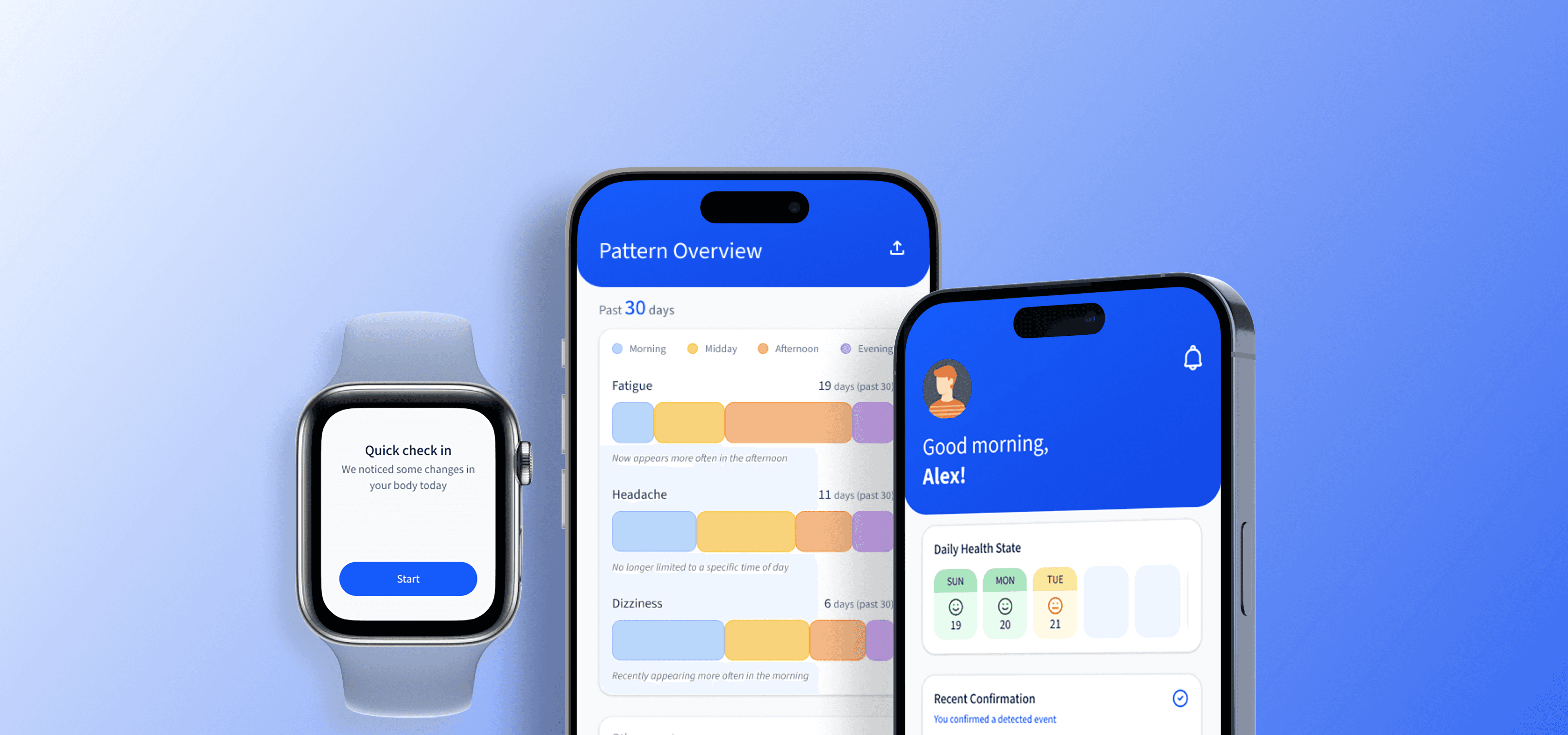
A proactive wellness platform for people in the pre-condition phase of chronic health risks, combining wearable signals, symptom self reporting, and ethical AI insights to support behavior change and doctor ready visits.
A proactive wellness platform for people in the pre-condition phase of chronic health risks, combining wearable signals, symptom self reporting, and ethical AI insights to support behavior change and doctor ready visits.
A proactive wellness platform for people in the pre-condition phase of chronic health risks, combining wearable signals, symptom self reporting, and ethical AI insights to support behavior change and doctor ready visits.
Role:
UX / Product Design
Timeline:
8 weeks
Focus:
Long term tracking
Scope:
Mobile & Watch
Role:
UX / Product Design
Timeline:
8 weeks
Focus:
Long term tracking
Scope:
Mobile & Watch
Role:
UX / Product Design
Timeline:
8 weeks
Focus:
Long term tracking
Scope:
Mobile & Watch
The Problem
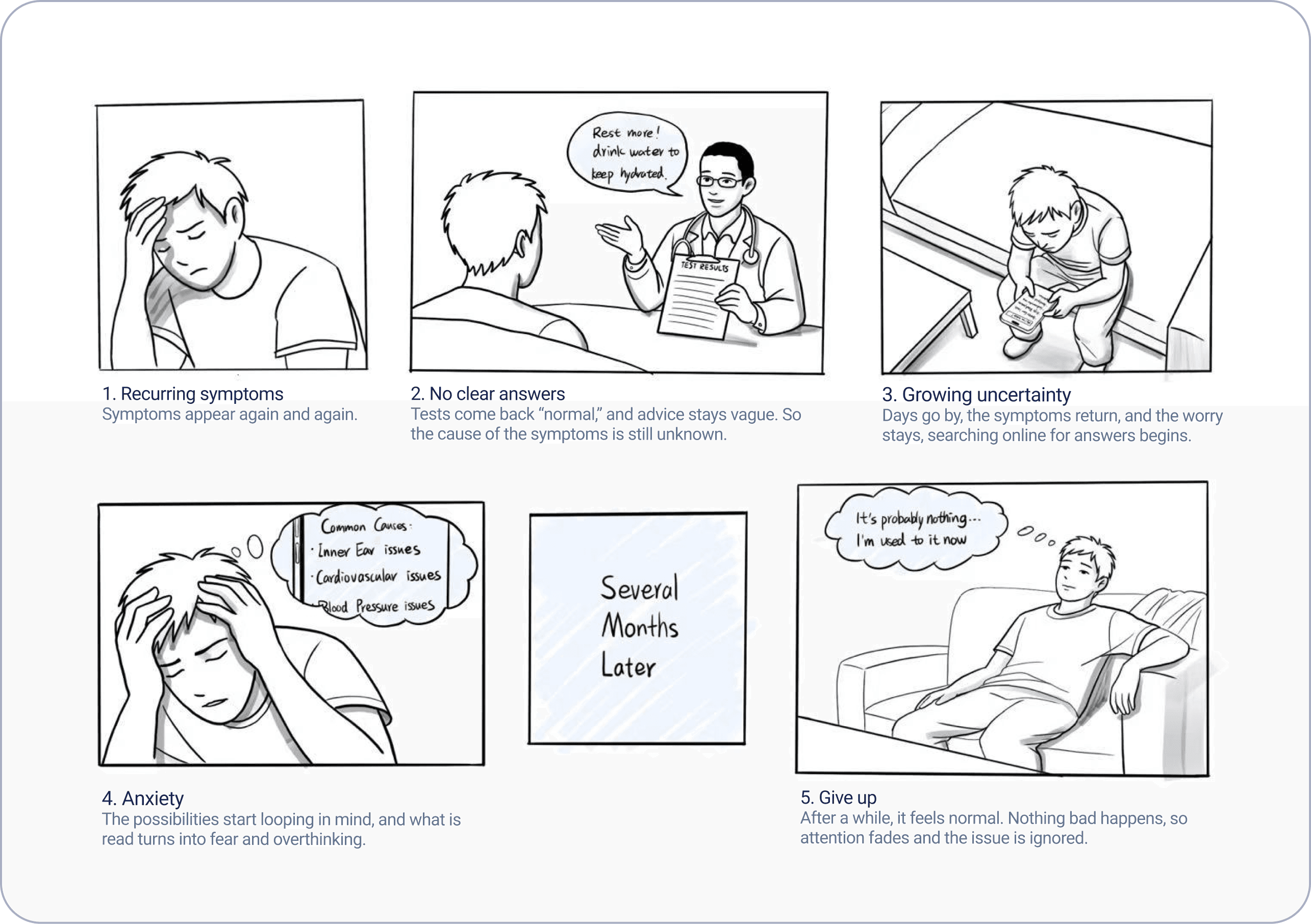
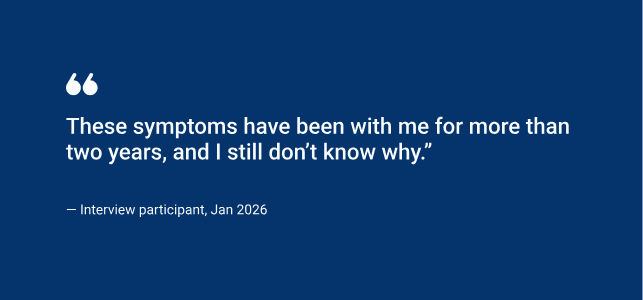
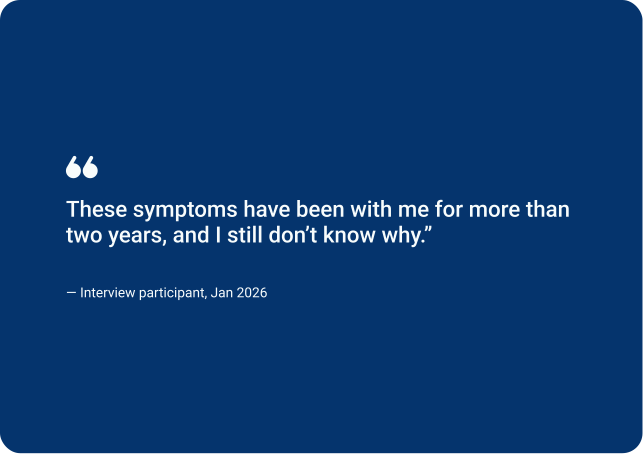
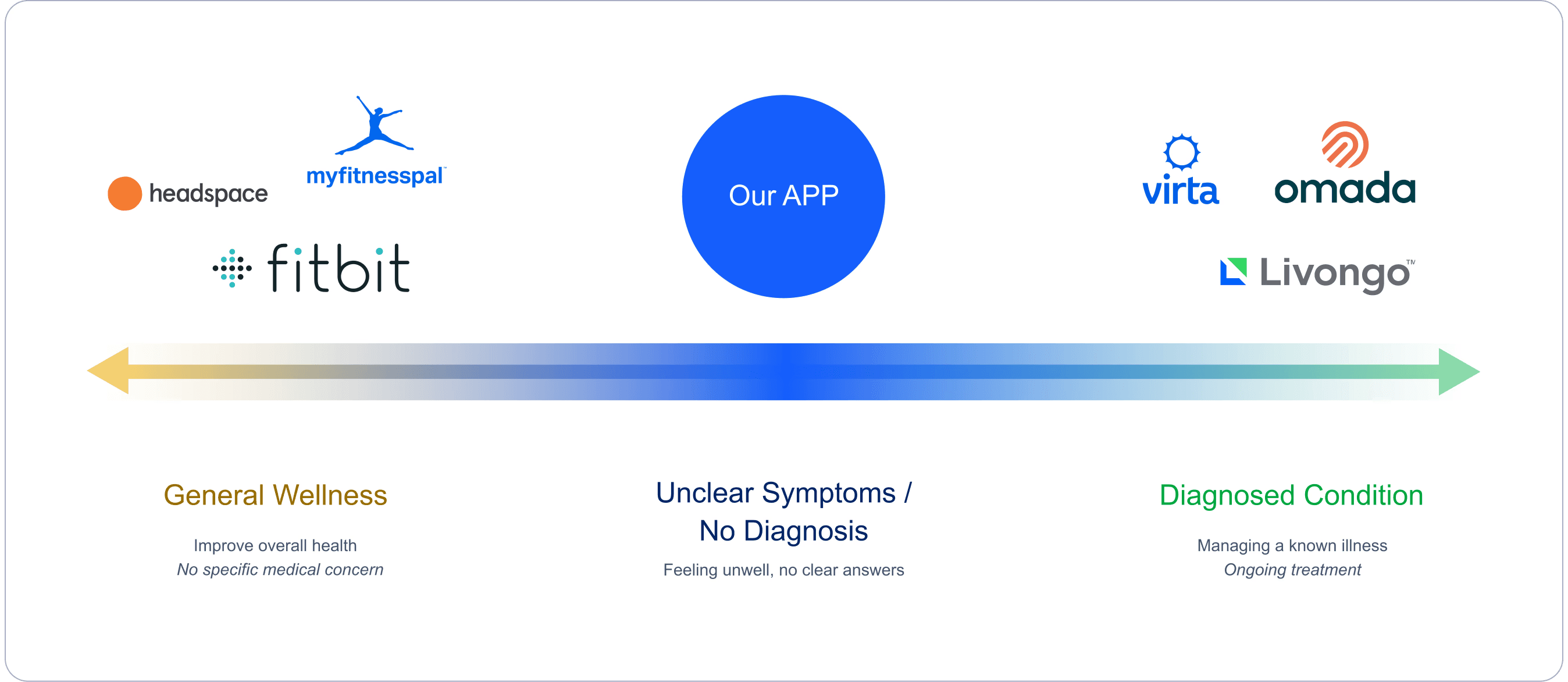
Many people live in a “gray zone” with repeated symptoms but no diagnosis. They are not sick enough to take medical action, but not well enough to ignore the signs. Their data is spread across wearables, personal feelings, and occasional lab results. So they do not have clear and ongoing context to understand patterns or get ready for care.
Many people live in a “gray zone” with repeated symptoms but no diagnosis. They are not sick enough to take medical action, but not well enough to ignore the signs. Their data is spread across wearables, personal feelings, and occasional lab results. So they do not have clear and ongoing context to understand patterns or get ready for care.
Many people live in a “gray zone” with repeated symptoms but no diagnosis. They are not sick enough to take medical action, but not well enough to ignore the signs. Their data is spread across wearables, personal feelings, and occasional lab results. So they do not have clear and ongoing context to understand patterns or get ready for care.
Positioning
This project explores how a system could help people interpret emerging health signals over time. Instead of diagnosing conditions, the goal is to surface patterns, reduce uncertainty, and help users decide when a medical visit may be worth pursuing.
Research
Online Questionnaire
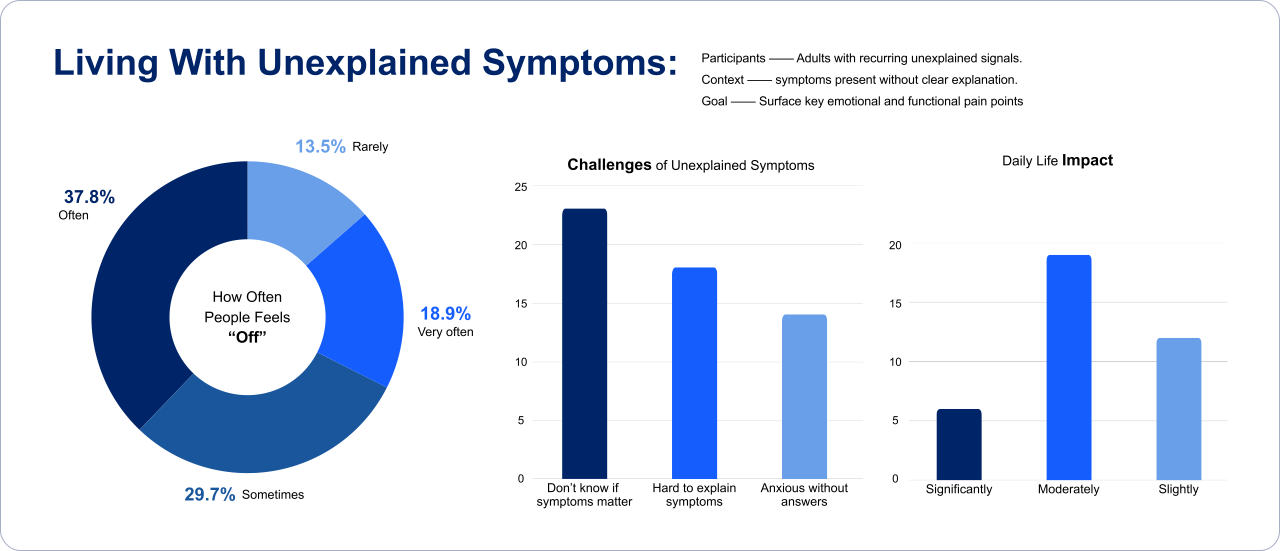
Participants: 43 individuals experiencing unresolved symptoms
Goal: Understand how people make sense of symptoms and decide when to act
Insights
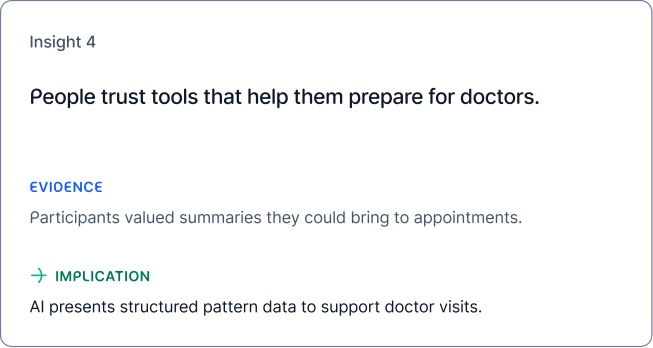
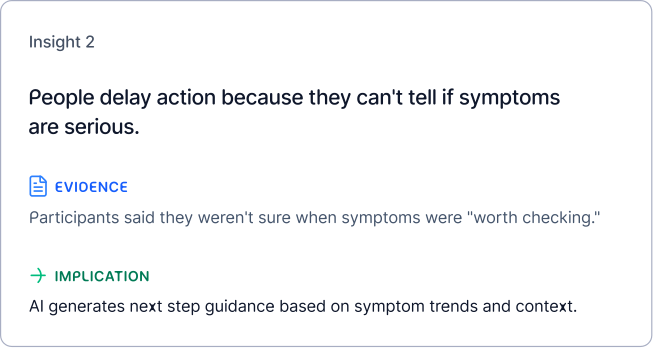
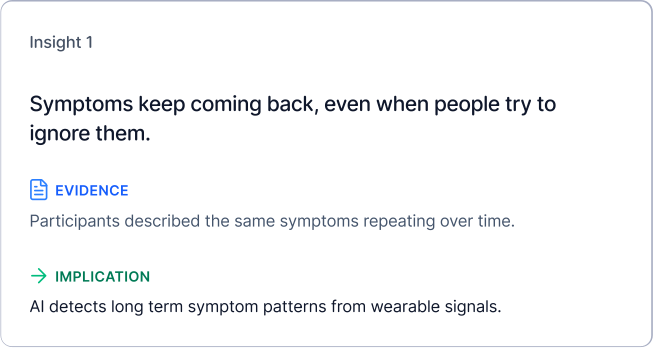
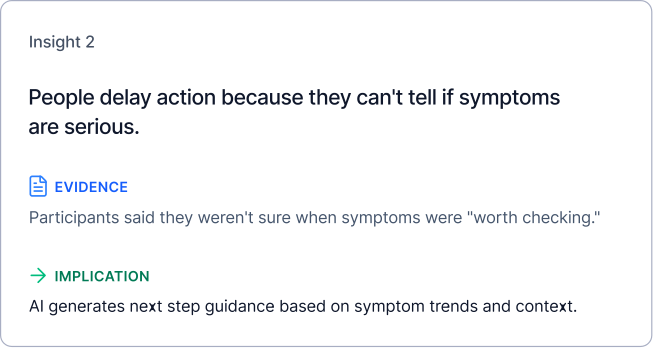
User Interview
Participants: 6 people from the survey pool
Format: Semi structured 1:1 interviews (30–45 minutes)
Goal: Understand how they make decisions, what they forget, and how they decide to seek care




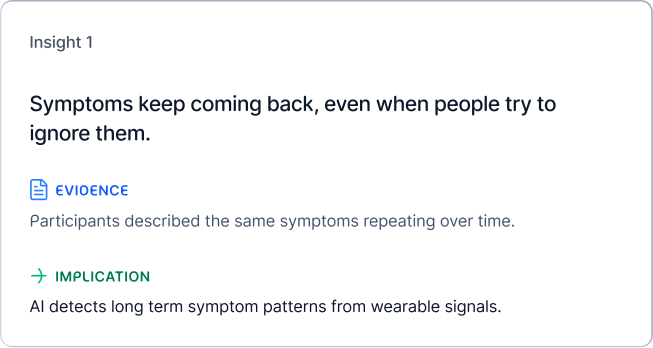
People delay action because symptoms appear isolated.
Recurring symptoms feel “not serious.” → Surface early patterns before users ignore signals.
Doctor visits are delayed without clear justification.
Cost and effort cause postponement. → Help users decide when a visit is worth it and how to prepare.
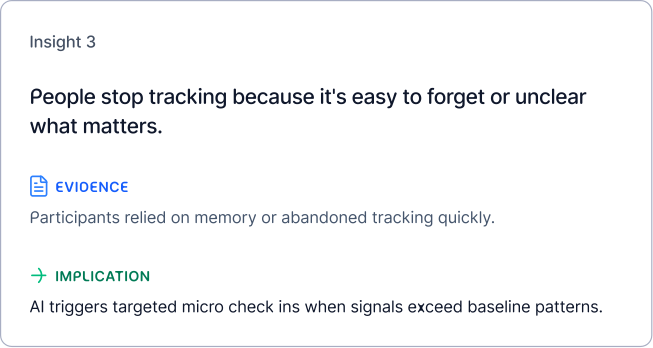
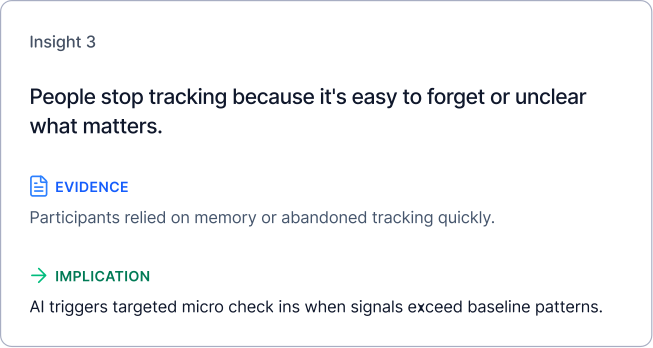
Memory breaks down quickly without support.
Hard to recall timing and triggers. → Use passive detection and quick check ins to reduce memory load.
Stress comes from not knowing what symptoms mean.
Confusion feels worse than discomfort. → Focus on sensemaking and next steps, not diagnosis.
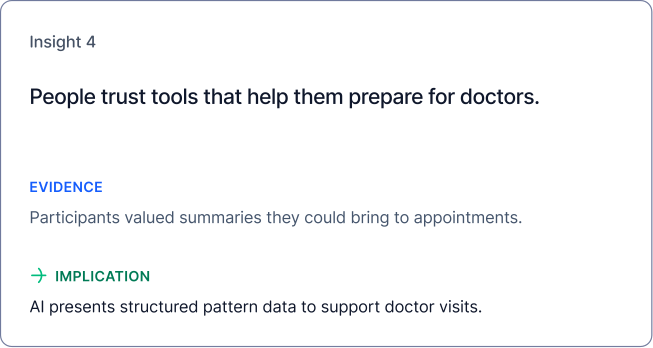
People want guidance without being medically diagnosed by an app.
Results feel vague or alarmist. → Provide possible next steps based on context, not final answers.
People delay action because symptoms appear isolated.
Recurring symptoms feel “not serious.” → Surface early patterns before users ignore signals.
Stress comes from not knowing what symptoms mean.
Confusion feels worse than discomfort. → Focus on sensemaking and next steps, not diagnosis.
Doctor visits are delayed without clear justification.
Cost and effort cause postponement. → Help users decide when a visit is worth it and how to prepare.
People want guidance without being medically diagnosed by an app.
Results feel vague or alarmist. → Provide possible next steps based on context, not final answers.
Memory breaks down quickly without support.
Hard to recall timing and triggers. → Use passive detection and quick check ins to reduce memory load.
Competitive Analysis
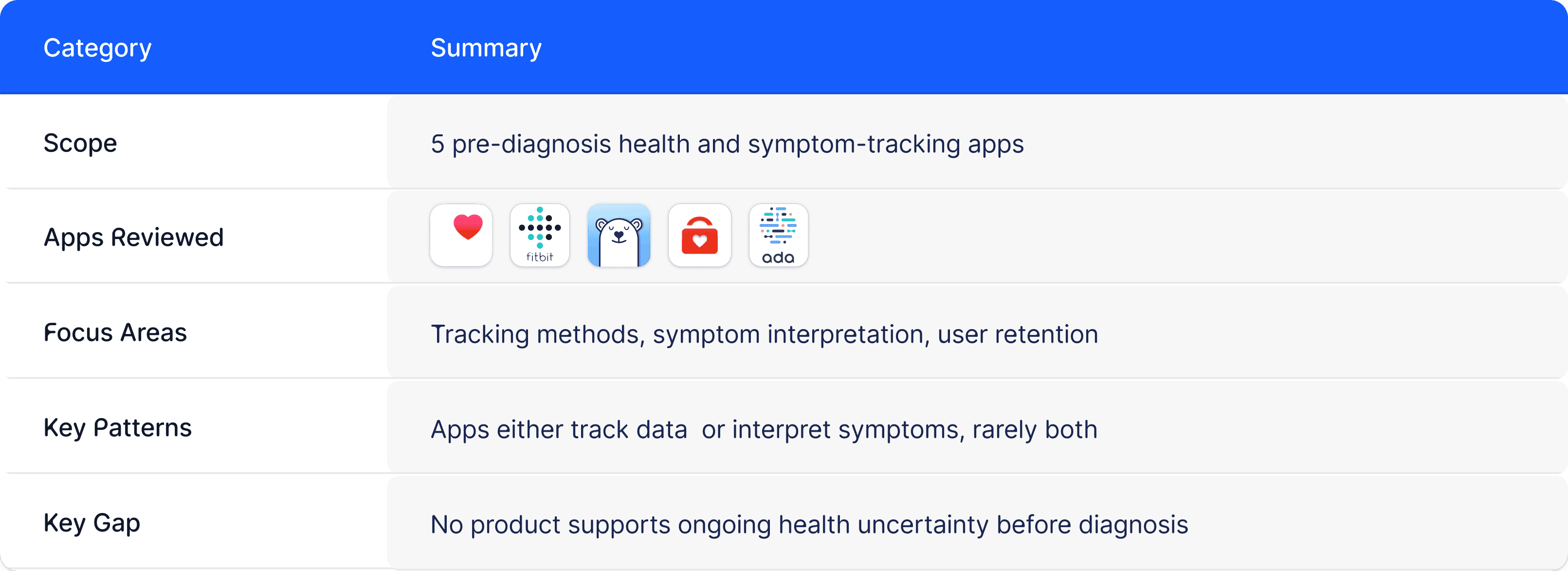
Data tracking apps:


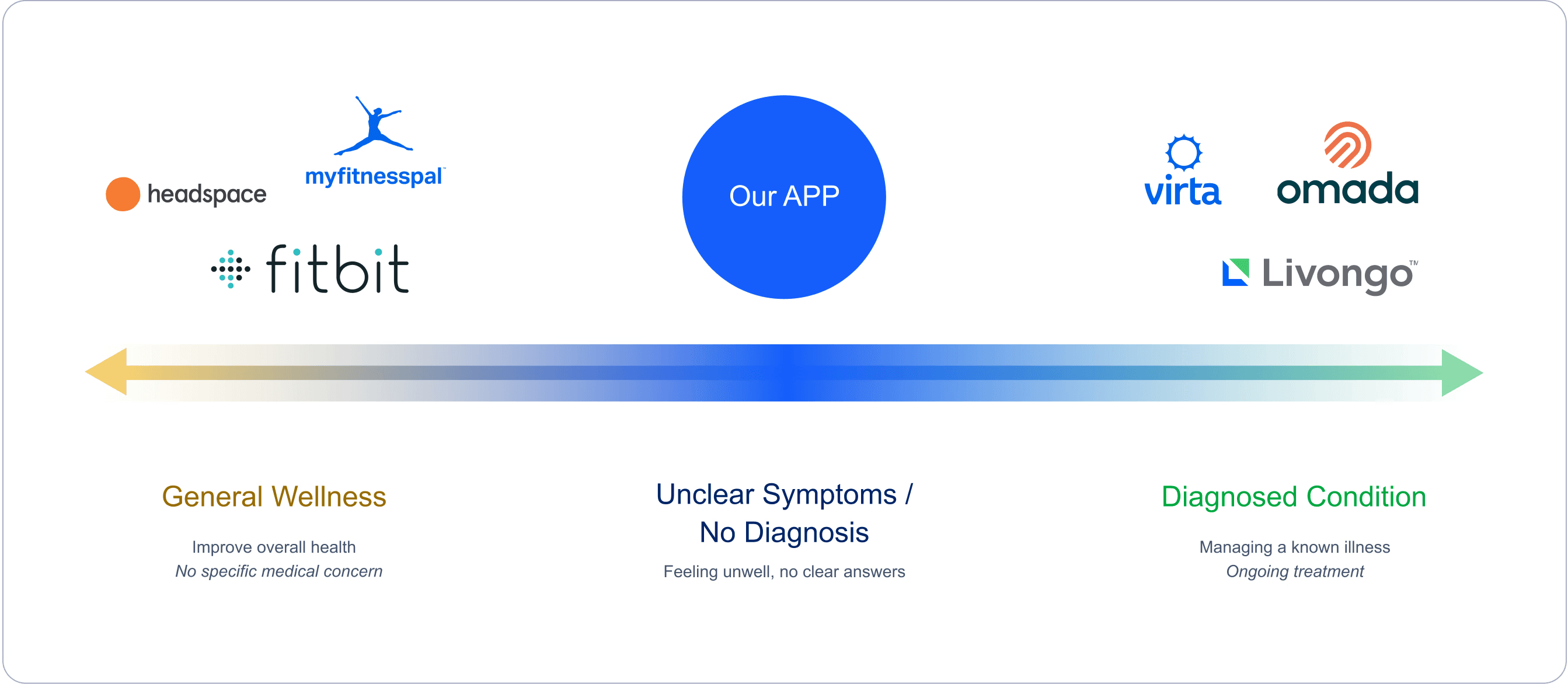
Collect lots of health data and show trends, but don’t explain what it means when something feels off.
Symptom logging apps:


Let people track symptoms, but make them enter data and find patterns on their own.
Symptom checker apps:
Ask questions and give answers in one session, but don’t help with ongoing symptoms over time.
Most health apps show numbers but don't explain meaning.
Most health apps show numbers but not meaning.
Create an AI summary of patterns in simple words.
Create simple AI summaries of patterns.
Existing apps separate symptoms from health context.
Track both together to show possible connections.
Track both to show possible connections.
Existing products show past data but lack action guidance.
Patterns become clear next steps, not static reports.
Patterns turn into clear next steps, not reports.
Products expect users to log everything and stay motivated.
Products expect users to keep logging and stay motivated.
Reduce effort with passive tracking and check ins.
Reduce effort by passive tracking and check ins.
How might we help people interpret emerging health signals over time without overwhelming, alarming, or replacing clinical authority?
Personas
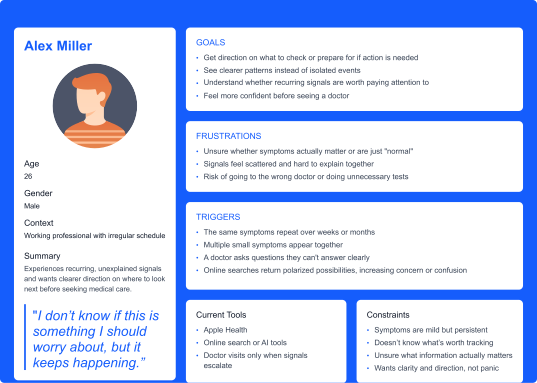
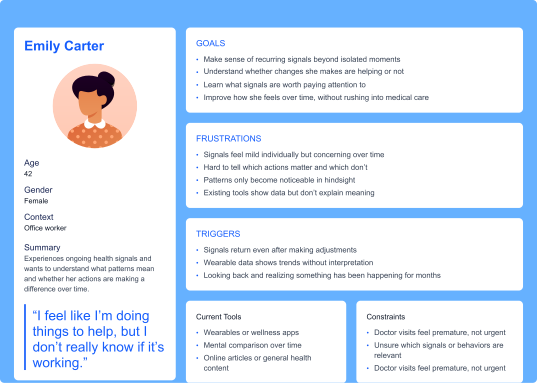
A primary persona shaped by recurring symptoms and fluctuating motivation, capturing two response patterns under health uncertainty, those who seek quick direction and those who look for patterns over time.
Core Scenarios
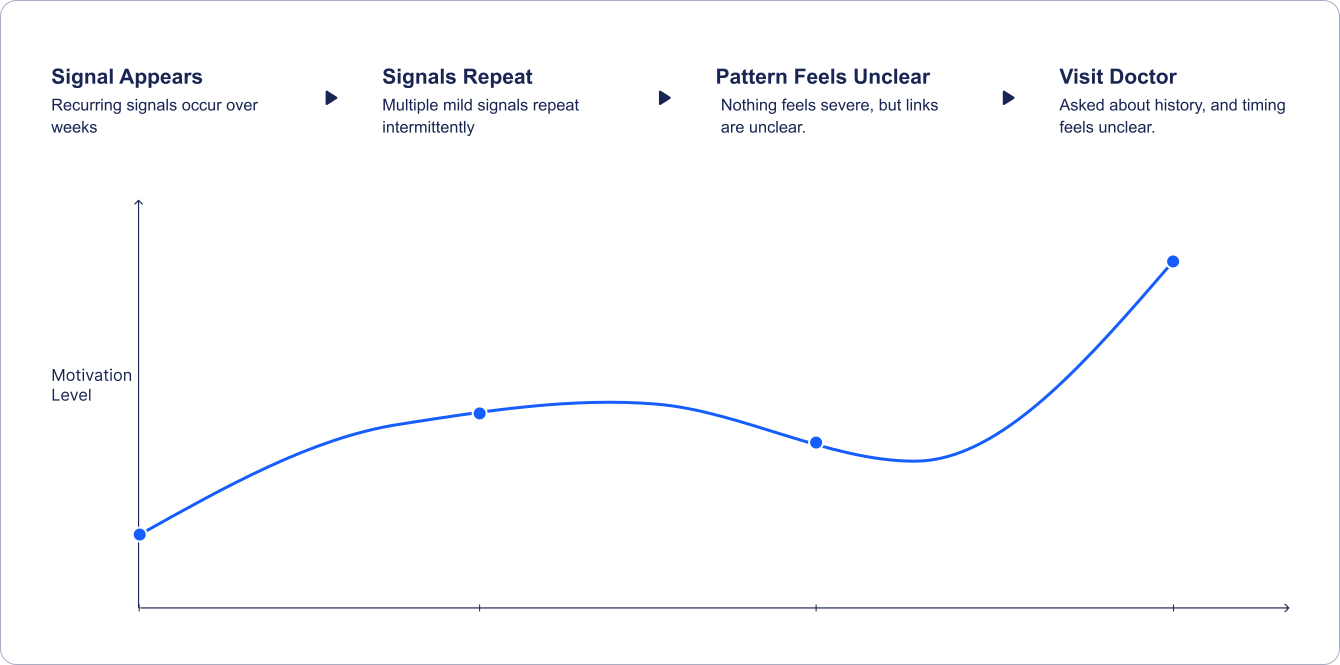
Long-term Journey (3–6 Months)
This is a long term experience. The product must provide value when symptoms are present — and when they are not.
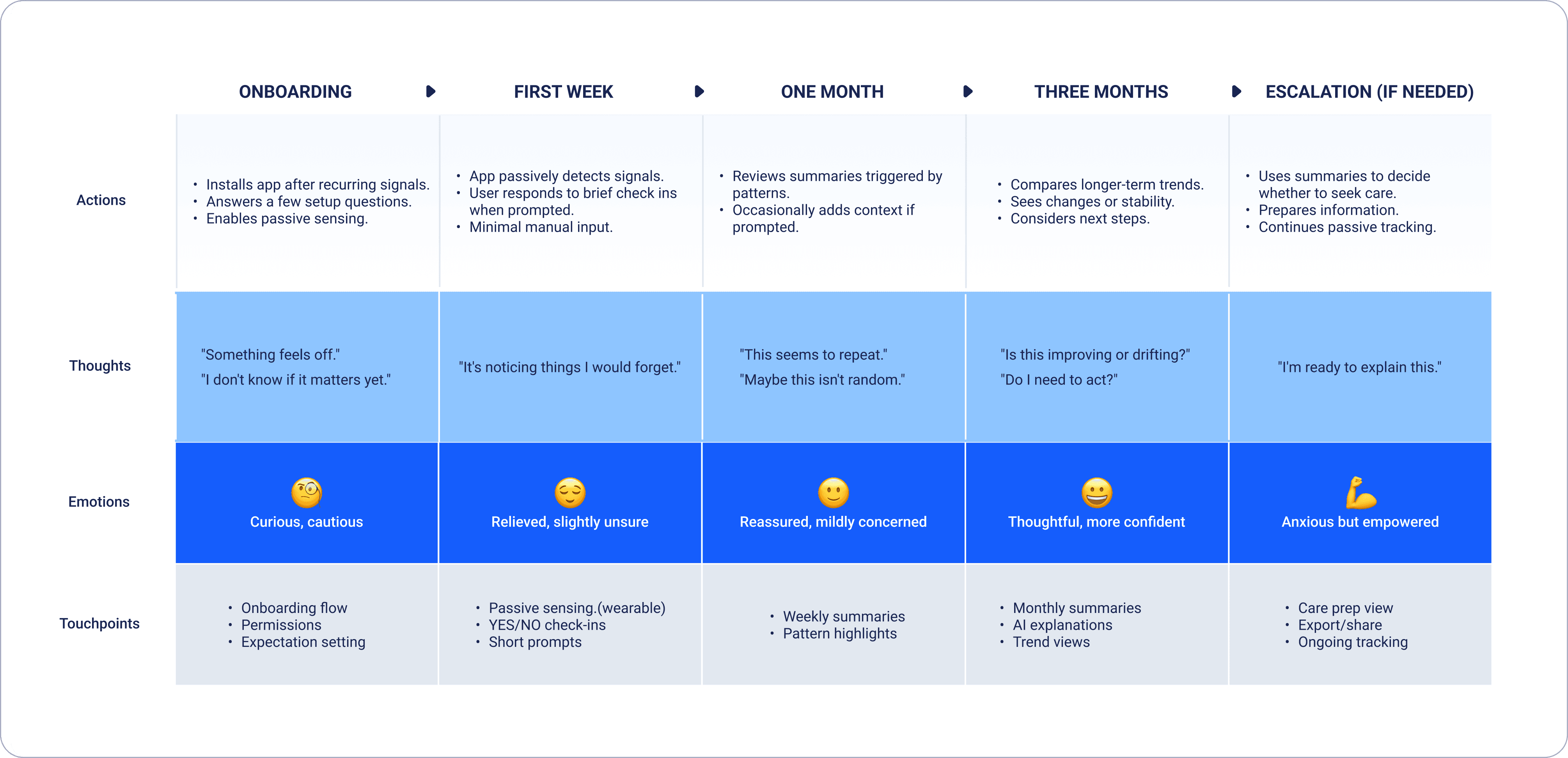
Drop off Risks
Quiet period disengagement (First week → early weeks): users drop off when symptoms aren’t noticeable and the app feels inactive or unnecessary.
Delayed value fatigue (First month): users stop engaging when early check ins don’t yet lead to visible insights or outcomes.
Uncertainty avoidance (One to three months): users disengage when emerging patterns raise concern without giving clear direction.
Quiet period disengagement (First week → early weeks): users drop off when symptoms aren’t noticeable and the app feels inactive or unnecessary.
Delayed value fatigue (First month): users stop engaging when early check ins don’t yet lead to visible insights or outcomes.
Uncertainty avoidance (One to three months): users disengage when emerging patterns raise concern without giving clear direction.
Quiet period disengagement (First week → early weeks): users drop off when symptoms aren’t noticeable and the app feels inactive or unnecessary.
Delayed value fatigue (First month): users stop engaging when early check ins don’t yet lead to visible insights or outcomes.
Uncertainty avoidance (One to three months): users disengage when emerging patterns raise concern without giving clear direction.
Delayed value fatigue (First month): users stop engaging when early check ins don’t yet lead to visible insights or outcomes.
Uncertainty avoidance (One to three months): users disengage when emerging patterns raise concern without giving clear direction.
Design Interventions
Quiet periods: confirm passive tracking is active and surface lightweight data, so users know the system is working, even when no clear direction is visible.
Delayed value: surface early summaries and set expectations for when patterns become clearer over time.
Uncertainty avoidance: avoid diagnosis or alarm, and provide gentle direction on what to observe or consider next.
Delayed value: surface early summaries and set expectations for when patterns become clearer over time.
Uncertainty avoidance: avoid diagnosis or alarm, and provide gentle direction on what to observe or consider next.
Data Inputs & Interaction Model
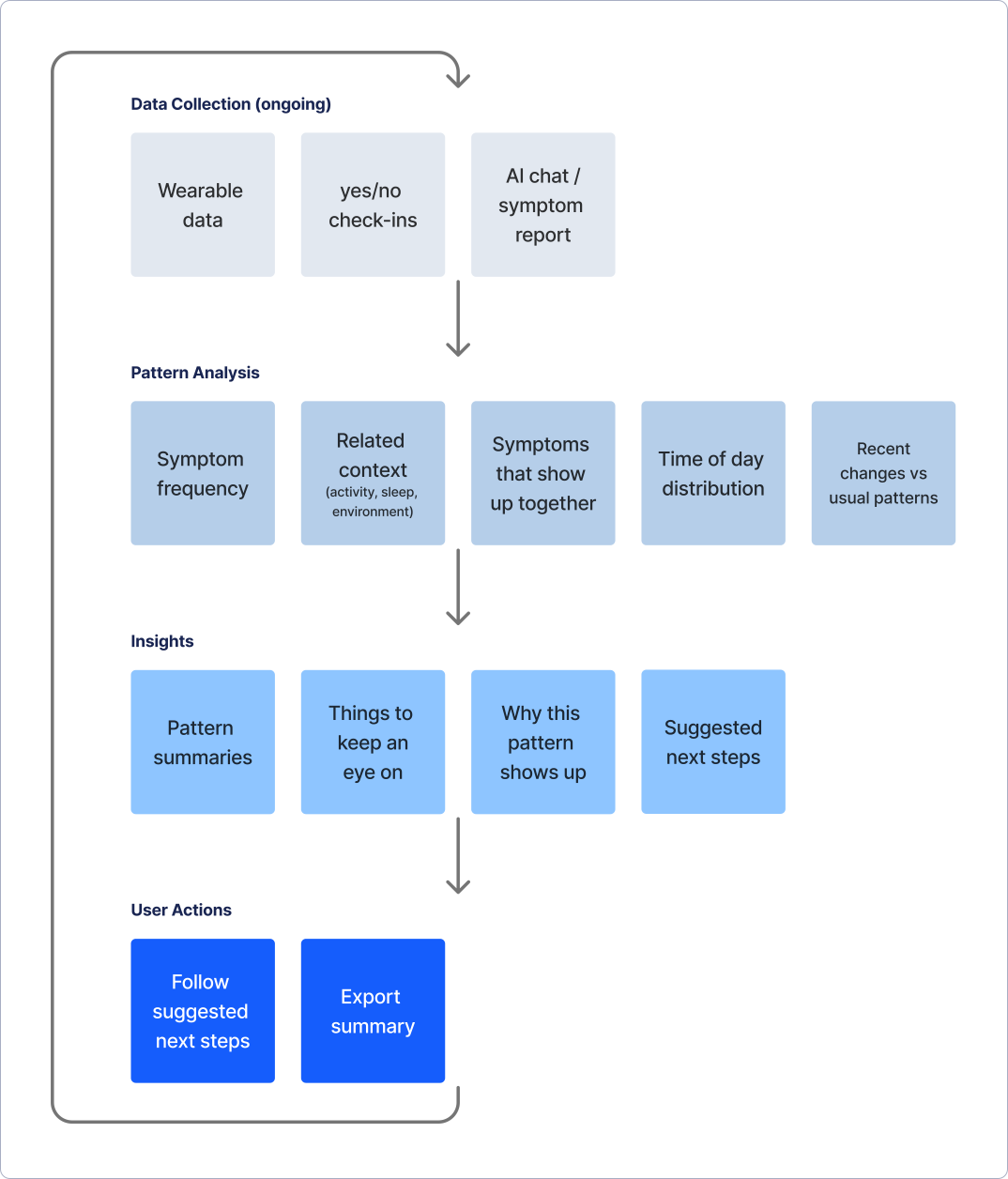
Combine passive wearable data with symptom reports, and use simple check ins for low motivation moments.
System Diagram
Wearable Metrics (Example)
Heart rate & HRV
Sleep duration & regularity
Activity level & sedentary time
Temperature trends
Respiratory rate (sleep)
Gait / movement stability
Design Interventions
Fatigue
Pain
Headaches
Sleep Disturbance
Dizziness
Brain Fog / Reduced Focus
Palpitations / Breath Discomfort
Fatigue
Pain
Headaches
Sleep Disturbance
Dizziness
Brain Fog / Reduced Focus
Palpitations / Breath
Core Flows
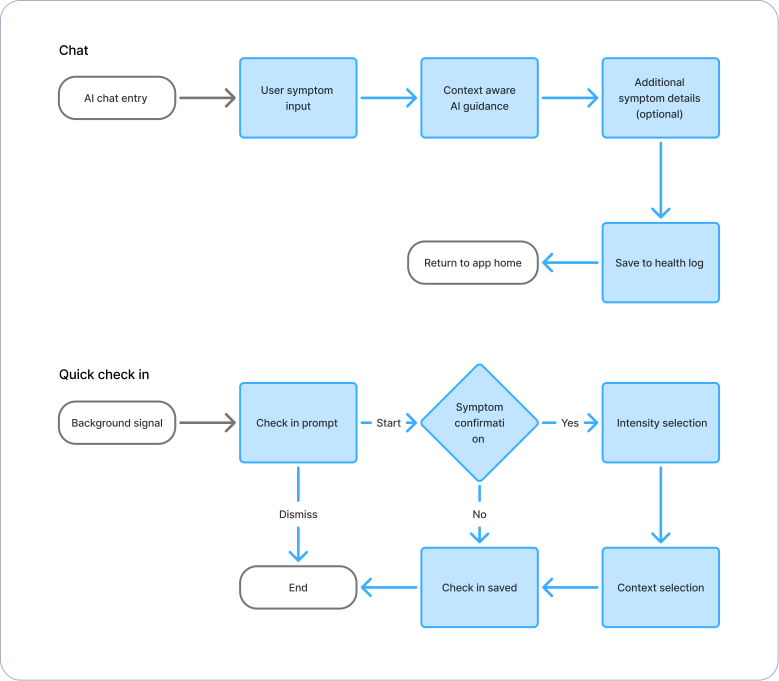
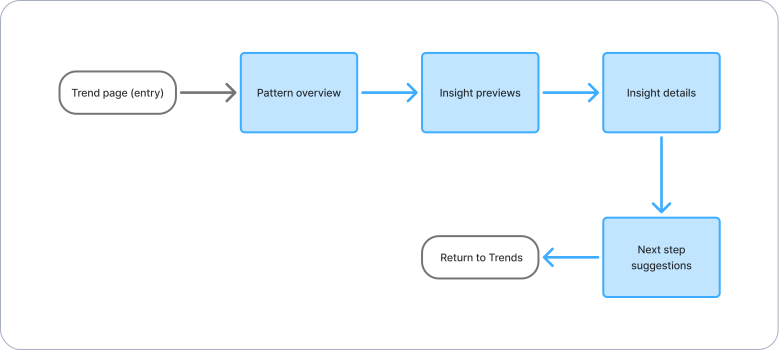
Key paths from onboarding to logging to insight to action, designed for clarity, low effort, and gentle escalation.
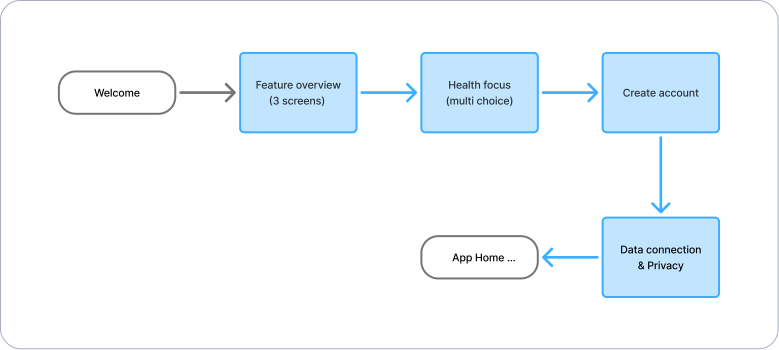
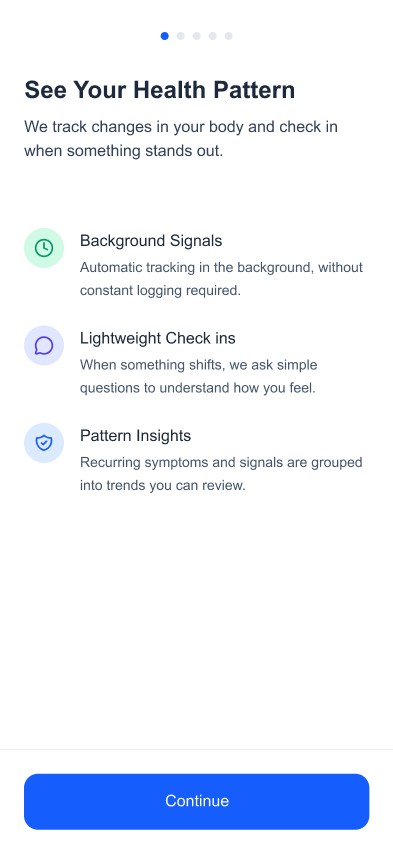
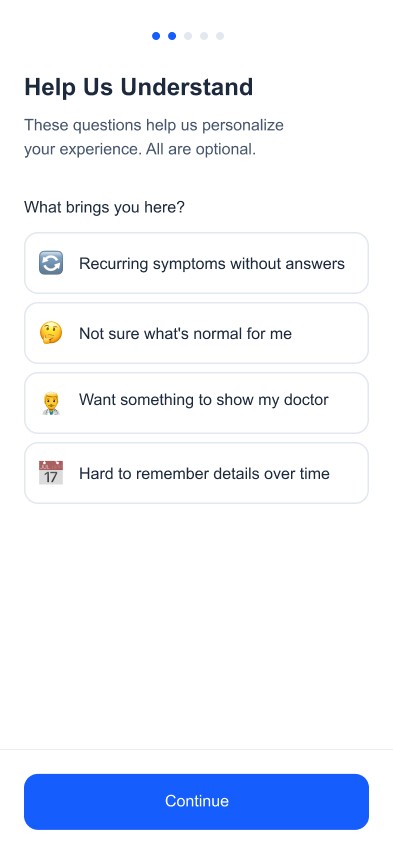
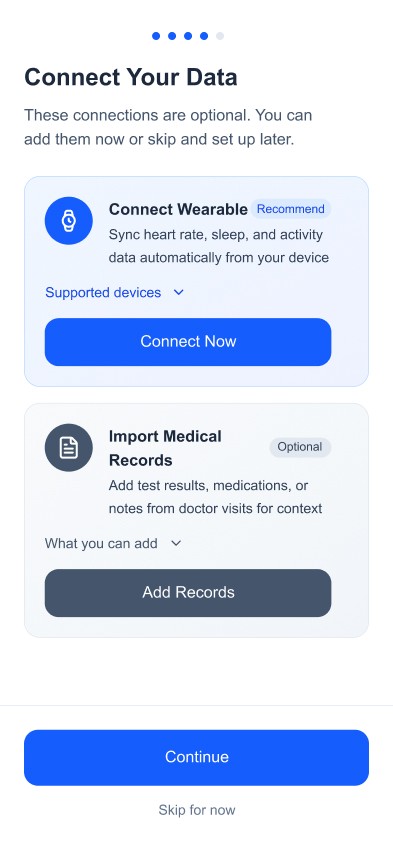
Flow 1 — Quick Onboarding & Wellness Profile
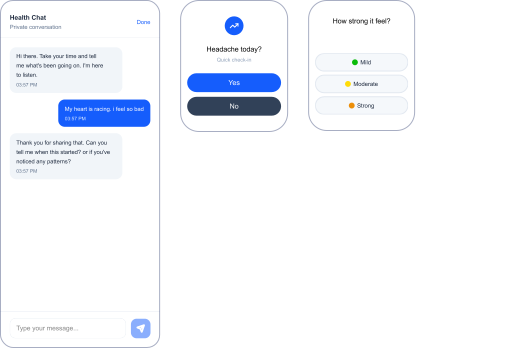
Flow 2 — AI Symptom Logging (Chat + Quick Check in)
Flow 3 — AI Pattern Insights → Action
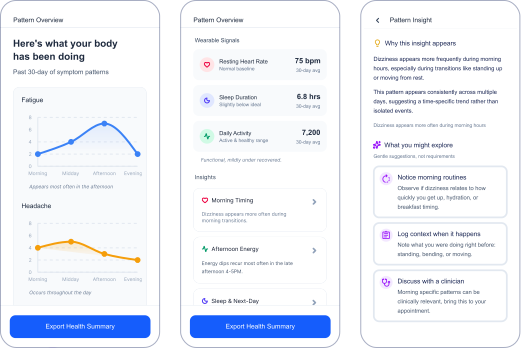
Flow 4 — AI Generated Doctor Ready Health Summary
Usability Testing
Usability Testing
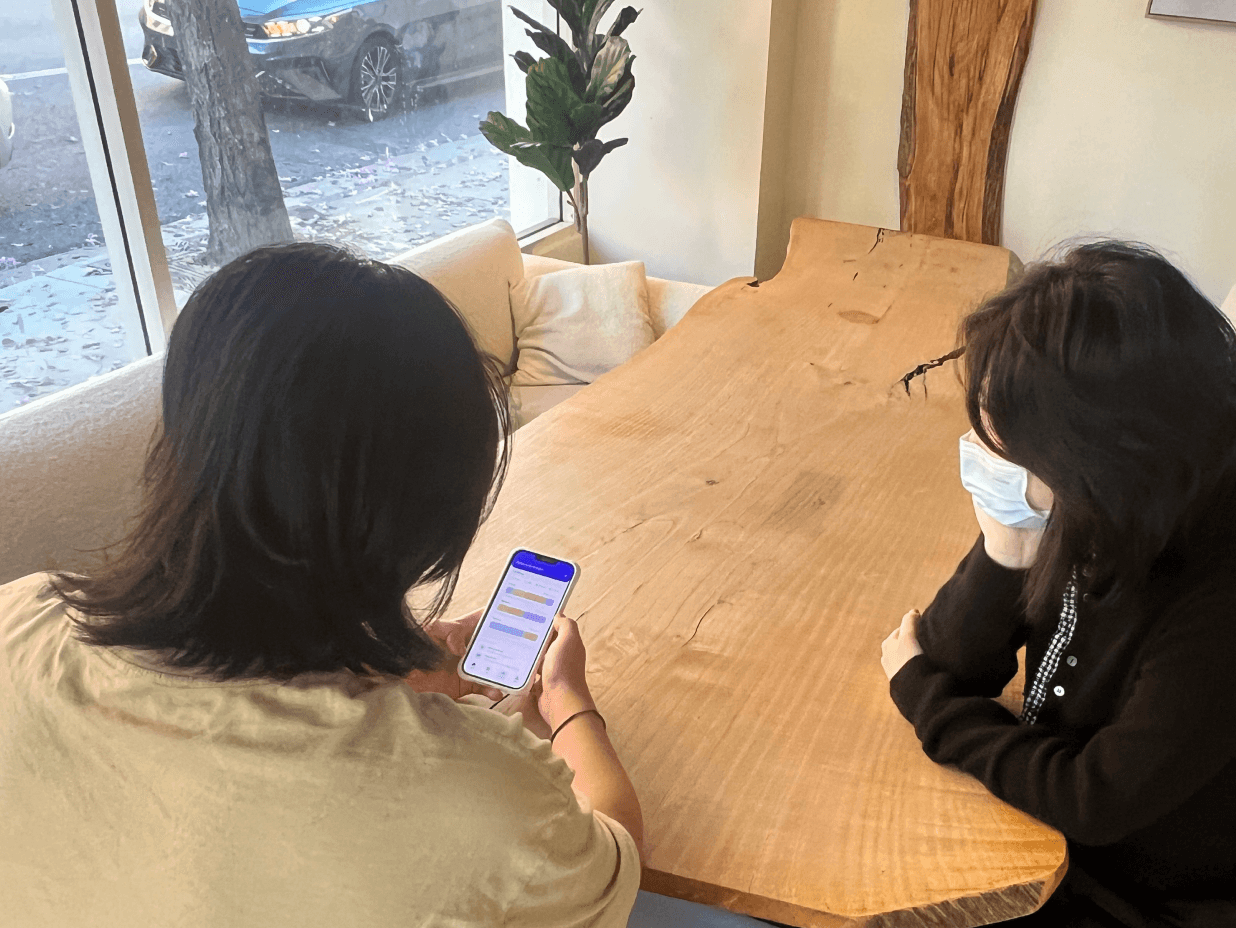
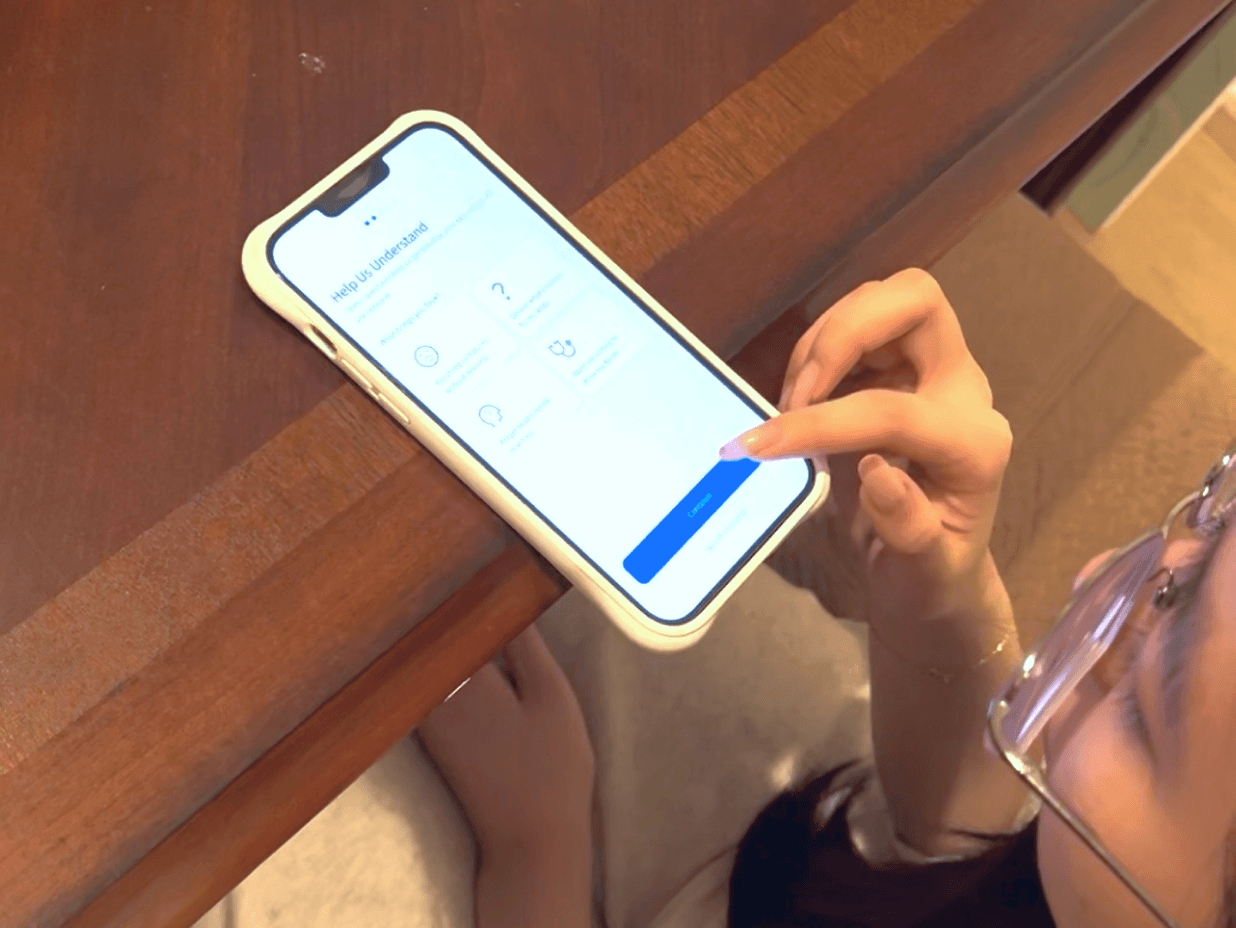
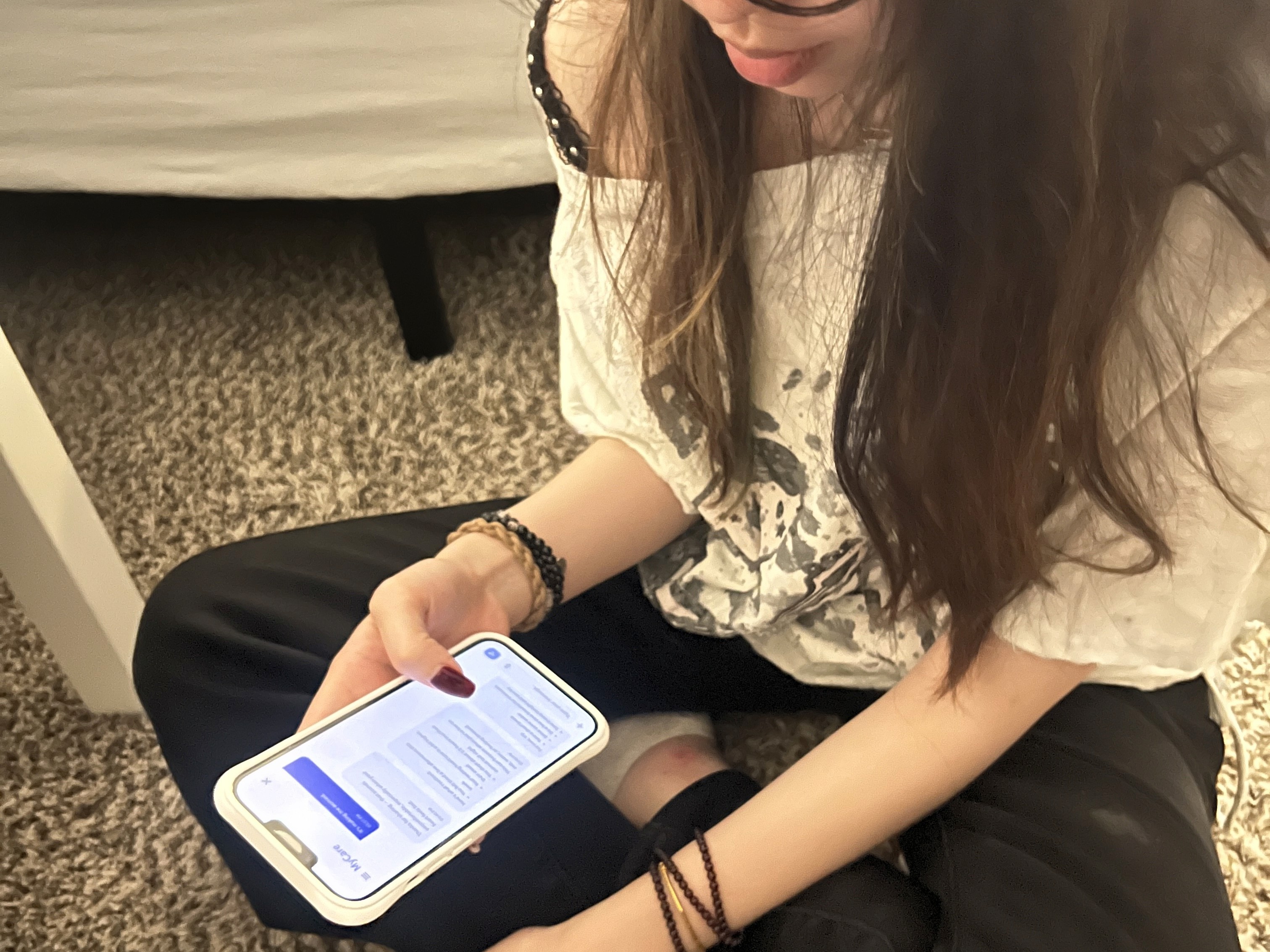
8 participants with recurring symptoms tested onboarding, check-ins, AI chat, insights, and export flows.
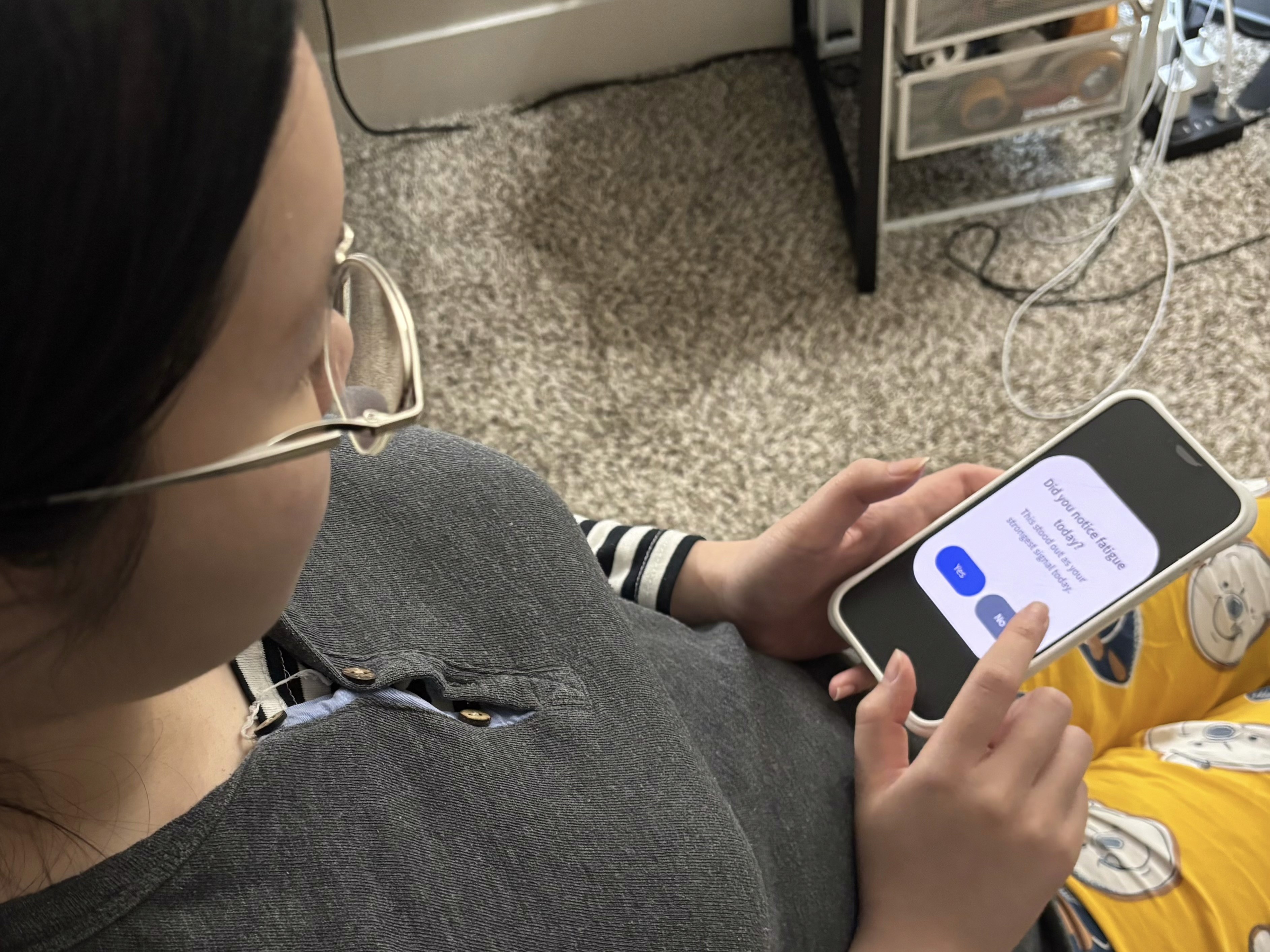
Task 1 — Onboarding
Goal: Understand what the app does and when to use it
Results
Feature explanation felt dense
Medical record upload felt premature
Wearable connection lacked clear purpose
Task 3 — AI Chat
Goal: Express symptoms and receive guidance
Results
Advice felt generic
No visible connection to personal history
Task 5 — Health Summary Export
Goal: Evaluate export usefulness
Results
Authority unclear
Viewed as helpful for doctors
Task 2 — Watch Check in
Goal: Respond to a triggered check in
Results
Trigger logic unclear
Users unsure how answers affect insights
100% completed, but only 45% understood impact
Task 4 — Insights & Pattern
Goal: Interpret trends and decide next steps
Results
Next steps felt vague
30-day charts misread as single day data
Task 1 — Onboarding
Goal: Understand what the app does and when to use it
Results
Feature explanation felt dense
Medical record upload felt premature
Wearable connection lacked clear purpose
Task 3 — AI Chat
Goal: Express symptoms and receive guidance
Results
Advice felt generic
No visible connection to personal history
Task 5 — Health Summary Export
Goal: Evaluate export usefulness
Results
Authority unclear
Viewed as helpful for doctors
Task 2 — Watch Check in
Goal: Respond to a triggered check in
Results
Trigger logic unclear
Users unsure how answers affect insights
100% completed, but only 45% understood impact
Task 4 — Insights & Pattern
Goal: Interpret trends and decide next steps
Results
Next steps felt vague
30-day charts misread as single day data
Task 1 — Onboarding
Goal: Understand what the app does and when to use it
Results
Feature explanation felt dense
Medical record upload felt premature
Wearable connection lacked clear purpose
Task 3 — AI Chat
Goal: Express symptoms and receive guidance
Results
Advice felt generic
No visible connection to personal history
Task 5 — Health Summary Export
Goal: Evaluate export usefulness
Results
Authority unclear
Viewed as helpful for doctors
Task 2 — Watch Check in
Goal: Respond to a triggered check in
Results
Trigger logic unclear
Users unsure how answers affect insights
100% completed, but only 45% understood impact
Task 4 — Insights & Pattern
Goal: Interpret trends and decide next steps
Results
Next steps felt vague
30-day charts misread as single day data
Iteration
Usability testing led to changes in all core flows. The two iterations below show the biggest structural improvements in user understanding and decision clarity.
1. Restructuring onboarding to reduce cognitive load and build trust
Early testing showed onboarding felt abstract and asked for commitment too soon. Users had trouble understanding features and setting preferences before using the product. So I showed value first, then moved to account setup and data connection.
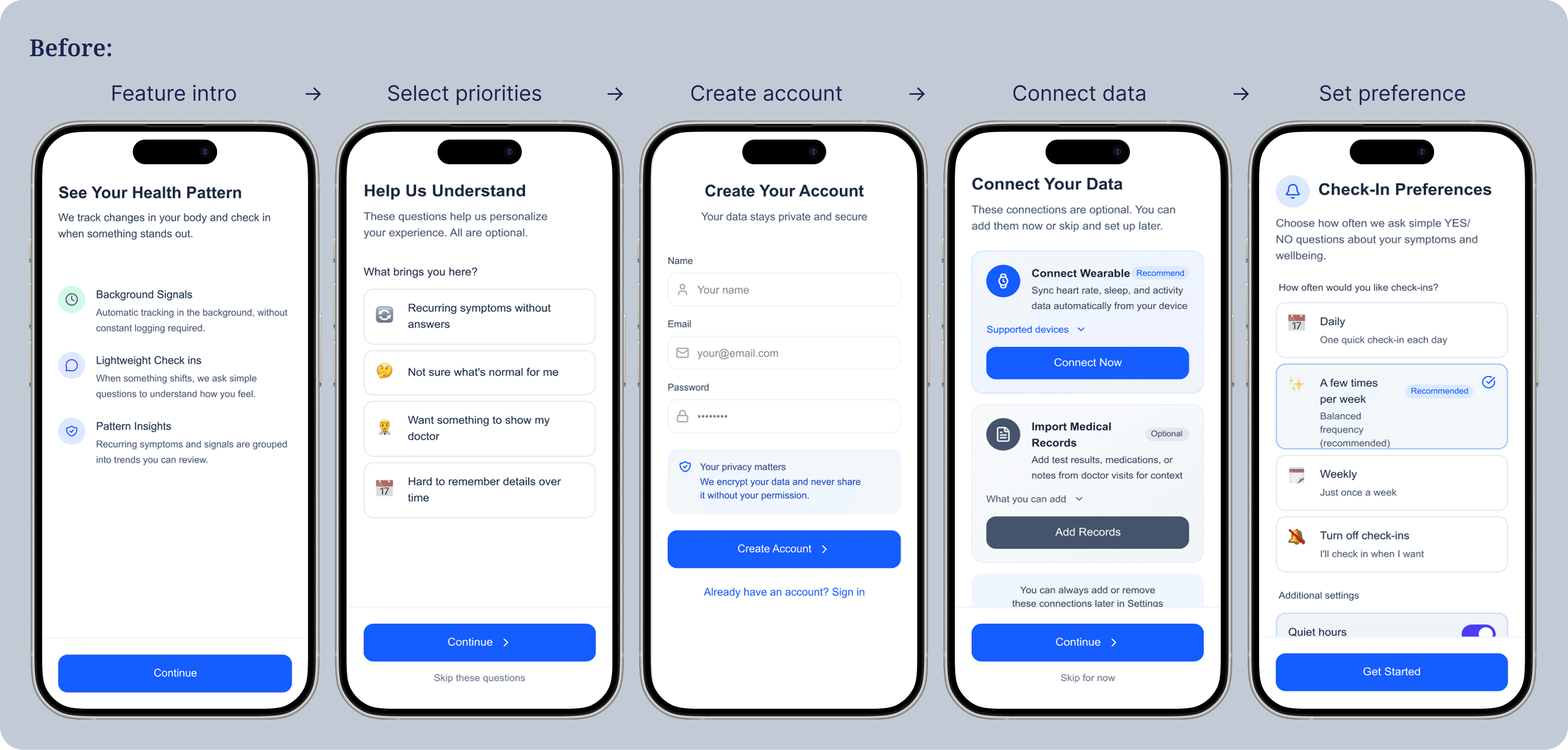
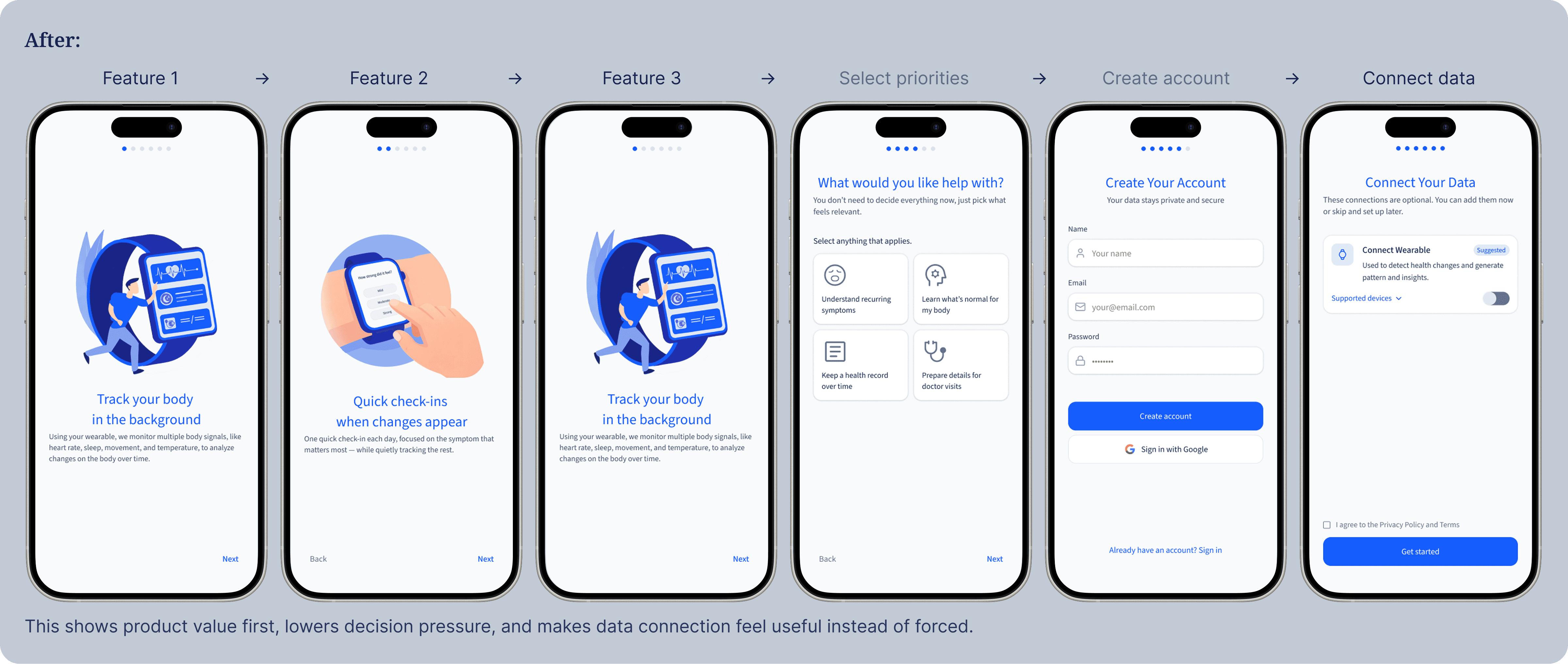
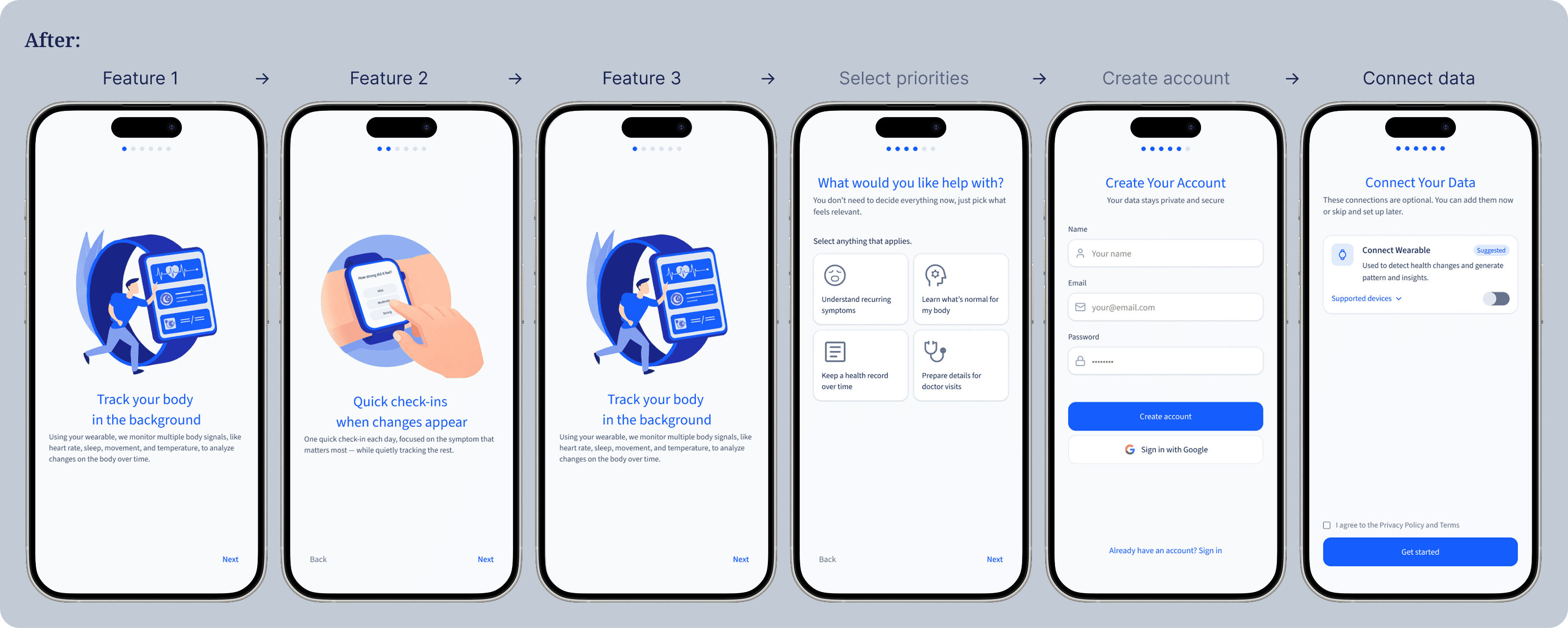
This shows product value first, lowers decision pressure, and makes data connection feel useful instead of forced.
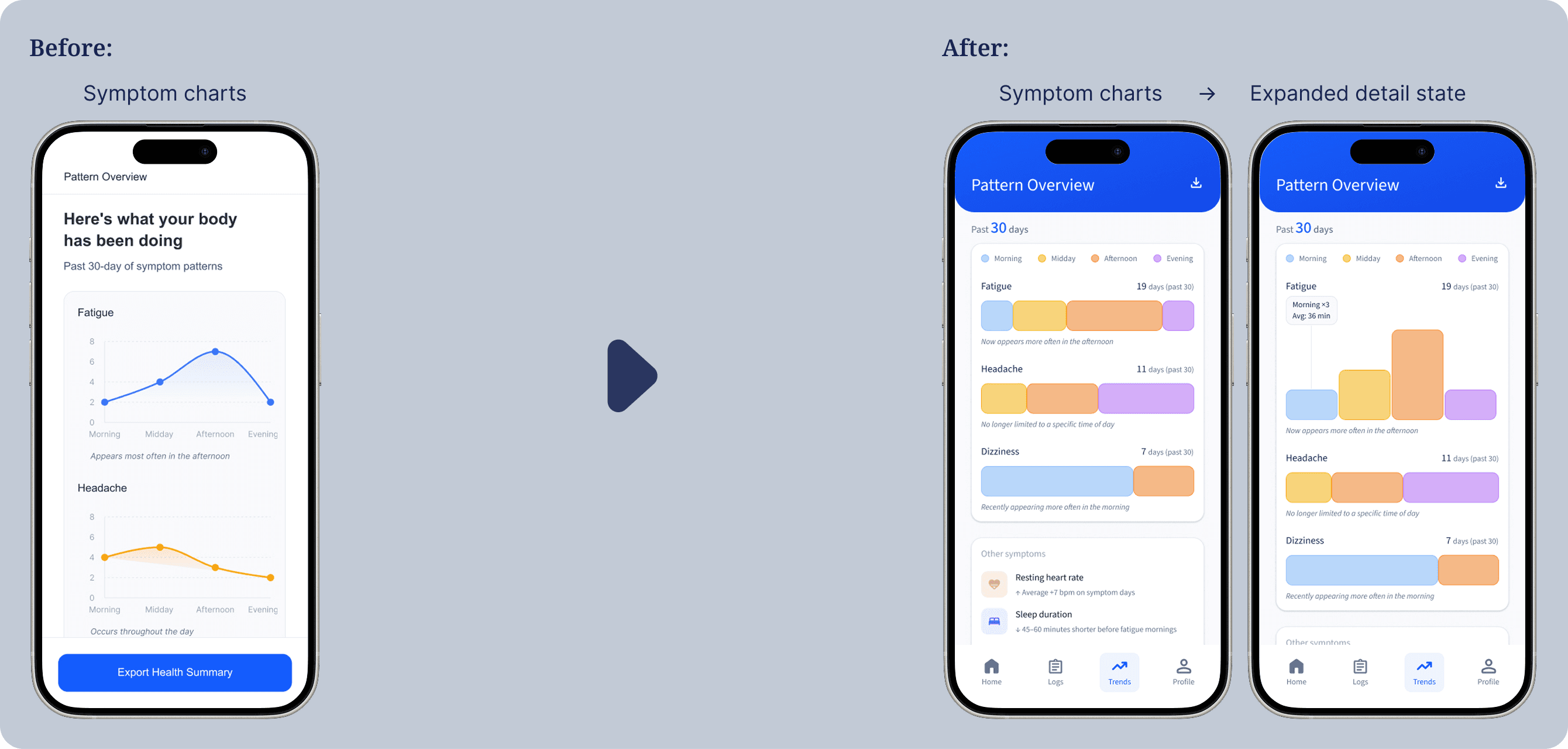
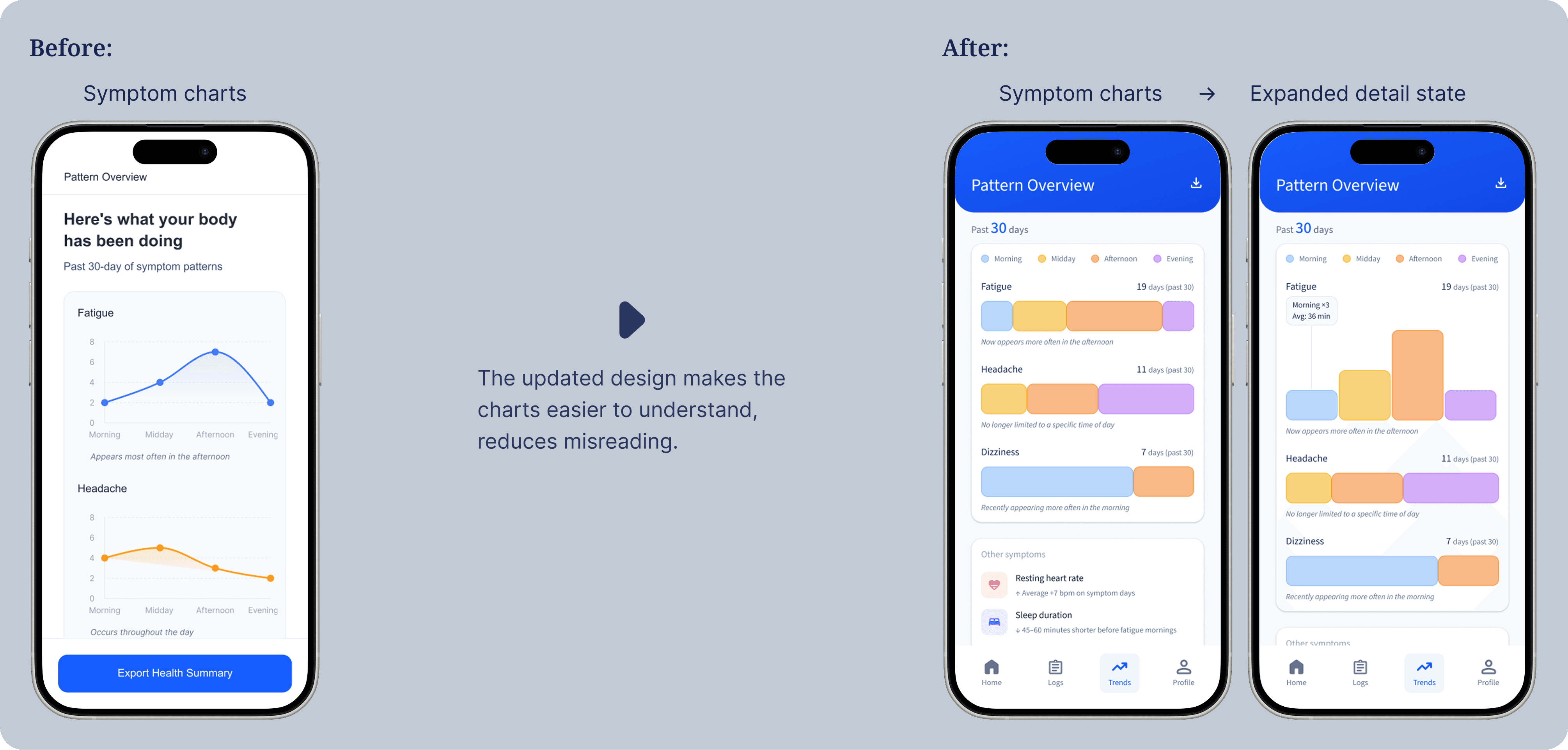
2. Improving pattern clarity with step by step details
Testing showed that users thought the 30-day chart was single-day data and did not understand how the patterns were found. The original layout did not have clear hierarchy or enough context.
The updated design makes the charts easier to understand, reduces misreading.
Key Screens & UI Rationale
A calm, non medical visual system that reduces anxiety, improves hierarchy, and helps users understand patterns clearly.
Dashboard / Home
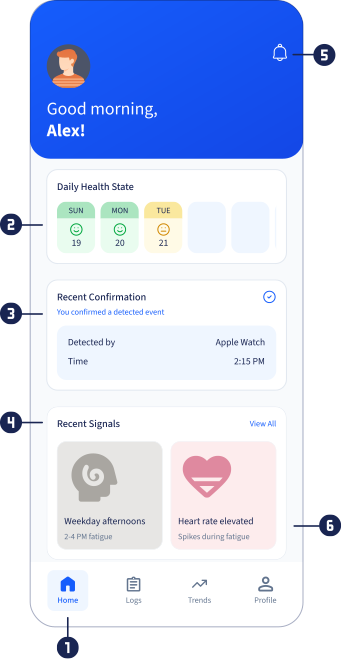
Home screen:
Short term signals appear before deeper insights to prevent premature conclusions.
Daily state:
Quick, non medical daily health state emojis.
Check in status:
Shows if today’s check in is done. Missing ones are marked so users can answer later to keep tracking consistent.
Recent signals:
Shows short term signal trends only.
Gentle reminders:
Health related reminders tied to signals. Quiet by default to avoid interrupting the dashboard.
Color use on signal cards:
Soft colors distinguish signal types, not urgency.
Watch check ins
Check in prompt:
This screen introduces the check in with calm language. It explains why it appears and puts awareness first, then action.
Start / Dismiss:
Start is shown clearly to help users act quickly. Dismiss follows the watch’s native gesture, so no extra button is needed.
Symptom confirmation:
Users confirm if they had the symptom today. The system shows the most relevant signal to avoid extra questions.
Symptom Log + Chat
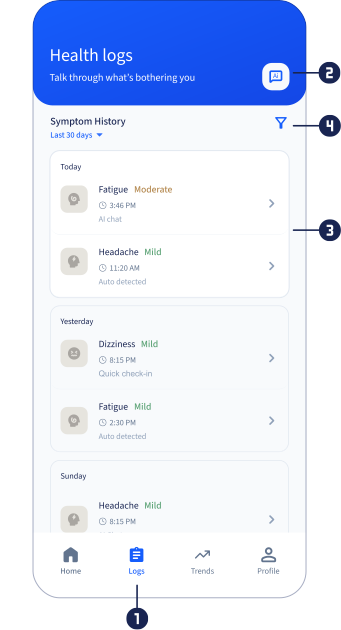
Logs screen:
A calm, non diagnostic space for for revisiting past signals and manually logging symptoms.
AI chat entry:
Provides support when symptoms feel confusing or emotionally concerning.
Symptom history:
Records what happened, without analysis or conclusions.
Time range & filters:
Time range and filters let users control how they see history.
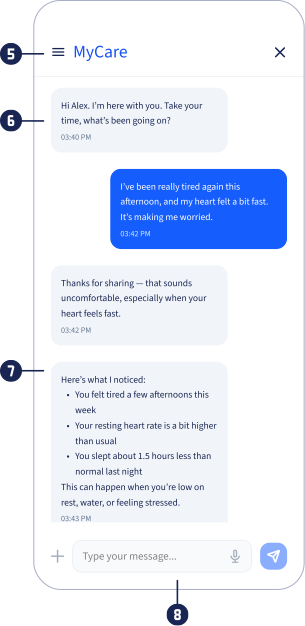
History access:
Conversation history reinforces continuity and trust, framing the AI as ongoing support.
AI response tone:
Language prioritizes empathy to reduce anxiety before offering any context or guidance.
AI response flow:
Validation, reassurance, optional direction, and logging confirmation.
Input area:
Multiple input modes reduce typing effort when symptoms or emotions are hard to explain.
Insight Screen
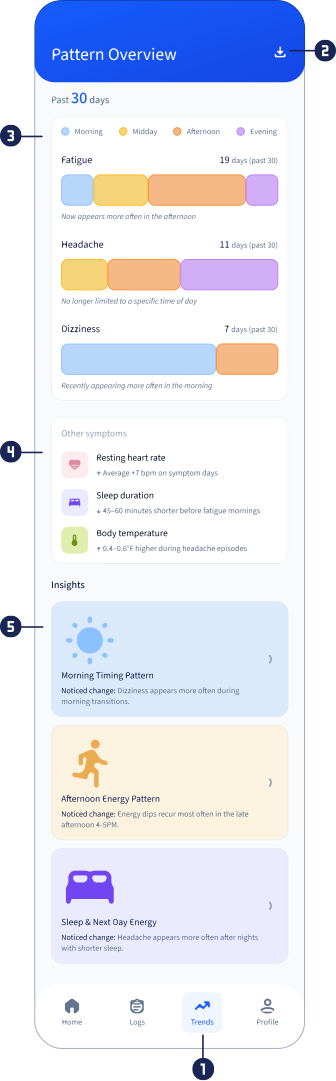
Trends screen:
Layers patterns, context, and optional insights with calm copy to support gradual understanding.
Export action:
Allows detailed metrics to be shared separately for clinical review, without crowding the main view.
Recurring symptoms:
Bars show when symptoms happen, how often, and any changes, making patterns easy to see.
Related signals:
Extra signals and states support symptom patterns without explaining them.
Insights (entry cards):
Insight cards are optional and use careful language, letting users choose when to explore.
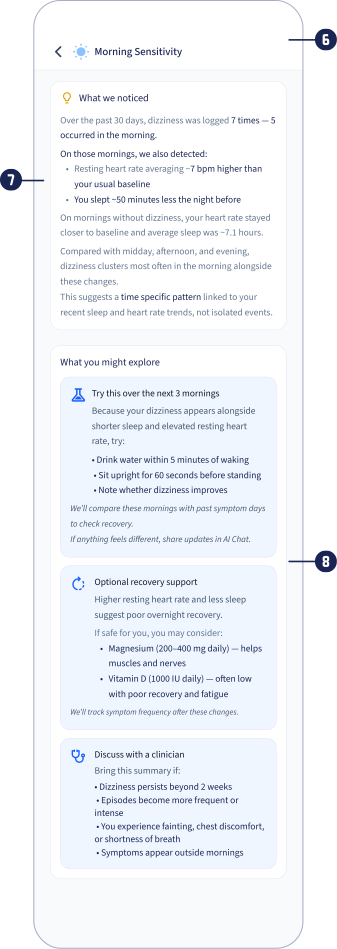
Insight detail screen:
This screen separates explanation from action to slow the experience and protect user agency.
Why:
The explanation shows patterns and changes in calm, neutral language.
Next steps:
Context based next steps with personalized actions and guided trials.
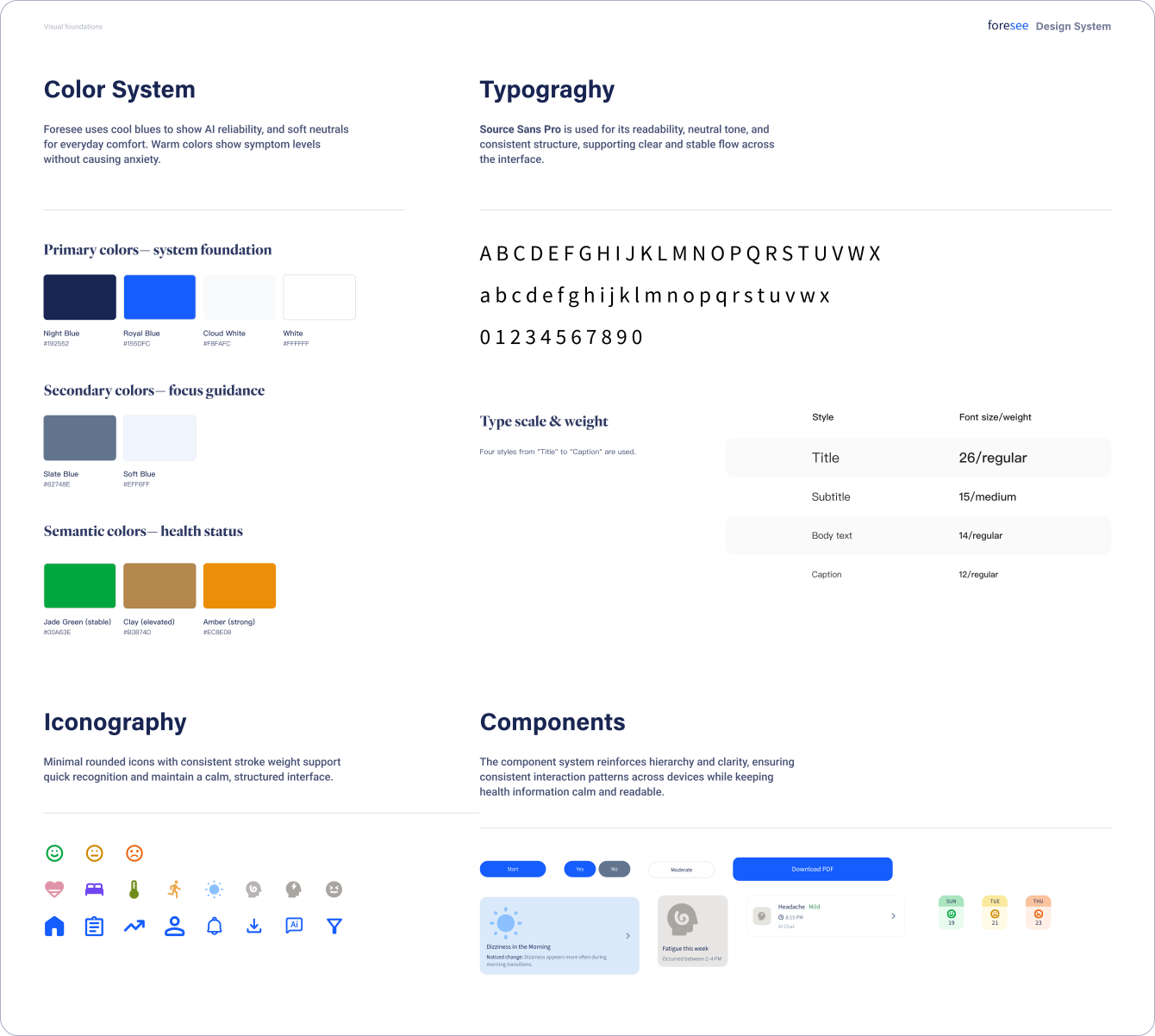
Design Elements
The interface keeps a clear and clinical structure to build trust and show accurate data. At the same time, lighter accent colors reduce visual heaviness. This balance supports emotional comfort without reducing clarity.
Reflection
Designing Foresee shifted my focus from building tracking screens to helping users interpret health signals. In early health stages, people are not looking for diagnoses. They want to know if a change in their body is worth paying attention to. Because of this, the design helps users see patterns across symptoms, lifestyle, and time so they can better judge when it may be worth talking to a doctor.
Next Steps
Long term testing: Test the system over a longer time to see how trust, engagement, and understanding change over weeks or months, not just in one session.
Long term testing: Test the system over a longer time to see how trust, engagement, and understanding change over weeks or months, not just in one session.
Long term testing: Test the system over a longer time to see how trust, engagement, and understanding change over weeks or months, not just in one session.
AI insight explanation: Explore ways to make AI insights easier to understand by showing the reason behind each insight, the confidence level, and the signals or data that helped the system detect the pattern.
AI insight explanation: Explore ways to make AI insights easier to understand by showing the reason behind each insight, the confidence level, and the signals or data that helped the system detect the pattern.
AI insight explanation: Explore ways to make AI insights easier to understand by showing the reason behind each insight, the confidence level, and the signals or data that helped the system detect the pattern.
Clinical collaboration: Work with healthcare professionals to test the doctor ready summary and check if the information is organized in a way that helps doctors quickly understand the user’s condition during a medical visit.
Clinical collaboration: Work with healthcare professionals to test the doctor ready summary and check if the information is organized in a way that helps doctors quickly understand the user’s condition during a medical visit.
Clinical collaboration: Work with healthcare professionals to test the doctor ready summary and check if the information is organized in a way that helps doctors quickly understand the user’s condition during a medical visit.
Adaptive personalization: Study how the system can gradually adjust signals and guidance based on each user’s past patterns and logged data, while keeping clear limits so the system does not give medical diagnosis or treatment advice.
Adaptive personalization: Study how the system can gradually adjust signals and guidance based on each user’s past patterns and logged data, while keeping clear limits so the system does not give medical diagnosis or treatment advice.
Adaptive personalization: Study how the system can gradually adjust signals and guidance based on each user’s past patterns and logged data, while keeping clear limits so the system does not give medical diagnosis or treatment advice.
— Clarity Before Diagnosis
Before Diagnosis
A proactive wellness platform for people in the pre-condition phase of chronic health risks, combining wearable signals, symptom self reporting, and ethical AI insights to support behavior change and doctor ready visits.
Role:
UX / Product Design
Timeline:
8 weeks
Focus:
Long term tracking
Scope:
Mobile & Watch
The Problem
Many people live in a “gray zone” with repeated symptoms but no diagnosis. They are not sick enough to take medical action, but not well enough to ignore the signs. Their data is spread across wearables, personal feelings, and occasional lab results. So they do not have clear and ongoing context to understand patterns or get ready for care.
Positioning
This project explores how a system could help people interpret emerging health signals over time. Instead of diagnosing conditions, the goal is to surface patterns, reduce uncertainty, and help users decide when a medical visit may be worth pursuing.
Research
Online Questionnaire
Participants: 43 individuals experiencing unresolved symptoms
Goal: Understand how people make sense of symptoms and decide when to act
Insights
User Interview
Participants: 6 people from the survey pool
Format: Semi structured 1:1 interviews (30 mins)
Goal: Understand how they make decisions, what they forget, and how they decide to seek care
People delay action because symptoms appear isolated.
Recurring symptoms feel “not serious.” → Surface early patterns before users ignore signals.
Stress comes from not knowing what symptoms mean.
Confusion feels worse than discomfort. → Focus on sensemaking and next steps, not diagnosis.
Doctor visits are delayed without clear justification.
Cost and effort cause postponement. → Help users decide when a visit is worth it and how to prepare.
People want guidance without being medically diagnosed by an app.
Results feel vague or alarmist. → Provide possible next steps based on context, not final answers.
Memory breaks down quickly without support.
Hard to recall timing and triggers. → Use passive detection and quick check ins to reduce memory load.
Competitive Analysis
Data tracking apps:
Collect lots of health data and show trends, but don’t explain what it means when something feels off.
Symptom logging apps:
Let people track symptoms, but make them enter data and find patterns on their own.
Symptom checker apps:
Ask questions and give answers in one session, but don’t help with ongoing symptoms over time.
Most health apps show numbers but not meaning.
Create an AI summary of patterns in
simple words.
Existing products show past data but lack action guidance.
Patterns become clear next steps, not
static reports.
Existing apps separate symptoms from health context.
Track both together to show possible connections.
Products expect users to log everything and stay motivated.
Reduce effort with passive tracking and check ins.
How might we help people interpret emerging health signals over time without overwhelming, alarming, or replacing clinical authority?
Personas
A primary persona shaped by recurring symptoms and fluctuating motivation, capturing two response patterns under health uncertainty, those who seek quick direction and those who look for patterns over time.
Core Scenarios
Long-term Journey (3–6 Months)
This is a long term experience. The product must provide value when symptoms are present — and when they are not.
Drop off Risks
Quiet period disengagement (First week → early weeks): users drop off when symptoms aren’t noticeable and the app feels inactive or unnecessary.
Delayed value fatigue (First month): users stop engaging when early check ins don’t yet lead to visible insights or outcomes.
Uncertainty avoidance (One to three months): users disengage when emerging patterns raise concern without giving clear direction.
Design Interventions
Quiet periods: confirm passive tracking is active and surface lightweight data, so users know the system is working, even when no clear direction is visible.
Delayed value: surface early summaries and set expectations for when patterns become clearer over time.
Uncertainty avoidance: avoid diagnosis or alarm, and provide gentle direction on what to observe or consider next.
Data Inputs & Interaction Model
Combine passive wearable data with symptom reports, and use simple check ins for low motivation moments.
System Diagram
Wearable Metrics (Example)
Heart rate & HRV
Sleep duration & regularity
Activity level & sedentary time
Temperature trends
Respiratory rate (sleep)
Gait / movement stability
Design Interventions
Fatigue
Pain
Headaches
Sleep Disturbance
Dizziness
Brain Fog / Reduced Focus
Palpitations / Breath Discomfort
Core Flows
Key paths from onboarding to logging to insight to action, designed for clarity, low effort, and gentle escalation.
Flow 1 — Quick Onboarding & Wellness Profile
Flow 2 — AI Symptom Logging (Chat + Quick Check in)
Flow 3 — AI Pattern Insights → Action
Flow 4 — AI Generated Doctor Ready Health Summary
Usability Testing
8 participants with recurring symptoms tested onboarding, check-ins, AI chat, insights, and export flows.
Task 1 — Onboarding
Goal: Understand what the app does and when to use
Results
Feature explanation felt dense
Medical record upload felt premature
Wearable connection lacked clear purpose
Task 2 — Watch Check in
Goal: Respond to a triggered check in
Results
Trigger logic unclear
Users unsure how answers affect insights
100% completed, but only 45% understood impact
Task 3 — AI Chat
Goal: Express symptoms and receive guidance
Results
Advice felt generic
No visible connection to personal history
Task 4 — Insights & Pattern
Goal: Interpret trends and decide next steps
Results
Next steps felt vague
30-day charts misread as single day data
Task 5 — Health Summary Export
Goal: Evaluate export usefulness
Results
Authority unclear
Viewed as helpful for doctors
Iteration
Usability testing led to changes in all core flows. The two iterations below show the biggest structural improvements in user understanding and decision clarity.
1. Restructuring onboarding to reduce cognitive load and build trust
Early testing showed onboarding felt abstract and asked for commitment too soon. Users had trouble understanding features and setting preferences before using the product. So I showed value first, then moved to account setup and data connection.
This shows product value first, lowers decision pressure, and makes data connection feel useful instead of forced.
2. Improving pattern clarity with step by step details
Testing showed that users thought the 30-day chart was single-day data and did not understand how the patterns were found. The original layout did not have clear hierarchy or enough context.
The updated design makes the charts easier to understand, reduces misreading.
Key Screens & UI Rationale
A calm, non medical visual system that reduces anxiety, improves hierarchy, and helps users understand patterns clearly.
Dashboard / Home
Home screen:
Short term signals appear before deeper insights to prevent premature conclusions.
Daily state:
Quick, non medical daily health state emojis.
Check in status:
Shows if today’s check in is done. Missing ones are marked so users can answer later to keep tracking consistent.
Recent signals:
Shows short term signal trends only.
Gentle reminders:
Health related reminders tied to signals. Quiet by default to avoid interrupting the dashboard.
Color use on signal cards:
Soft colors distinguish signal types, not urgency.
Watch check ins
Check in prompt:
This screen introduces the check in with calm language. It explains why it appears and puts awareness first, then action.
Start / Dismiss:
Start is shown clearly to help users act quickly. Dismiss follows the watch’s native gesture, so no extra button is needed.
Symptom confirmation:
Users confirm if they had the symptom today. The system shows the most relevant signal to avoid extra questions.
Symptom Log + Chat
Logs screen:
A calm, non diagnostic space for for revisiting past signals and manually logging symptoms.
AI chat entry:
Provides support when symptoms feel confusing or emotionally concerning.
Symptom history:
Records what happened, without analysis or conclusions.
Time range & filters:
Time range and filters let users control how they see history.
History access:
Conversation history reinforces continuity and trust, framing the AI as ongoing support.
AI response tone:
Language prioritizes empathy to reduce anxiety before offering any context or guidance.
AI response flow:
Validation, reassurance, optional direction, and logging confirmation.
Input area:
Multiple input modes reduce typing effort when symptoms or emotions are hard to explain.
Insight Screen
Trends screen:
Layers patterns, context, and optional insights with calm copy to support gradual understanding.
Export action:
Allows detailed metrics to be shared separately for clinical review, without crowding the main view.
Recurring symptoms:
Bars show when symptoms happen, how often, and any changes, making patterns easy to see.
Related signals:
Extra signals and states support symptom patterns without explaining them.
Insights (entry cards):
Insight cards are optional and use careful language, letting users choose when to explore.
Insight detail screen:
This screen separates explanation from action to slow the experience and protect user agency.
Why:
The explanation shows patterns and changes in calm, neutral language.
Next steps:
Context based next steps with personalized actions and guided trials.
Design Elements
The interface keeps a clear and clinical structure to build trust and show accurate data. At the same time, lighter accent colors reduce visual heaviness. This balance supports emotional comfort without reducing clarity.
Reflection
Designing Foresee shifted my focus from building tracking screens to helping users interpret health signals. In early health stages, people are not looking for diagnoses. They want to know if a change in their body is worth paying attention to. Because of this, the design helps users see patterns across symptoms, lifestyle, and time so they can better judge when it may be worth talking to a doctor.
Next Steps
Long term testing: Test the system over a longer time to see how trust, engagement, and understanding change over weeks or months, not just in one session.
AI insight explanation: Explore ways to make AI insights easier to understand by showing the reason behind each insight, the confidence level, and the signals or data that helped the system detect the pattern.
Clinical collaboration: Work with healthcare professionals to test the doctor ready summary and check if the information is organized in a way that helps doctors quickly understand the user’s condition during a medical visit.
Adaptive personalization: Study how the system can gradually adjust signals and guidance based on each user’s past patterns and logged data, while keeping clear limits so the system does not give medical diagnosis or treatment advice.